⚠️ Affiliate Disclosure: This page contains affiliate links. We may earn a commission at no extra cost to you. This does not influence our reviews. Read full disclosure →

Time Doctor Review

Time Doctor logo

Time Doctor Review

4.5

Time Doctor Overview

Time Doctor is a productivity and time-tracking software designed to help businesses and individuals manage work efficiently. Being a leading review platform, we at Idealonlinebusiness found that it is a platform that monitors employee performance, tracks tasks, and improves accountability. Companies of all sizes use it to increase productivity. It provides reports, integrations, and project tracking features for managers and teams. In this article, we explore its features, services, pricing, pros, and comparisons. If you’re looking for detailed insights, this Time Doctor review will give you the clarity you need.

Productivity Tracking

This software captures time spent on tasks, providing detailed reports for employers. It allows managers to measure employee performance without micromanaging, ensuring transparency and accountability while reducing wasted hours on non-work-related activities.

Screen Monitoring

Time Doctor offers optional screenshot monitoring. Businesses can activate it to see activity levels while respecting privacy. This creates a balance between productivity assurance and trust within teams, especially in remote work settings.

Distraction Alerts

When an employee spends too much time on social media or unrelated sites, the platform sends gentle reminders. These alerts keep workers focused, encouraging discipline and better task completion rates throughout the workday.

Client Billing

Companies can use Time Doctor to accurately bill clients based on tracked work hours. Automated timesheets and invoices reduce disputes, improve trust, and simplify financial management for service-based businesses dealing with multiple clients.

Detailed Reports

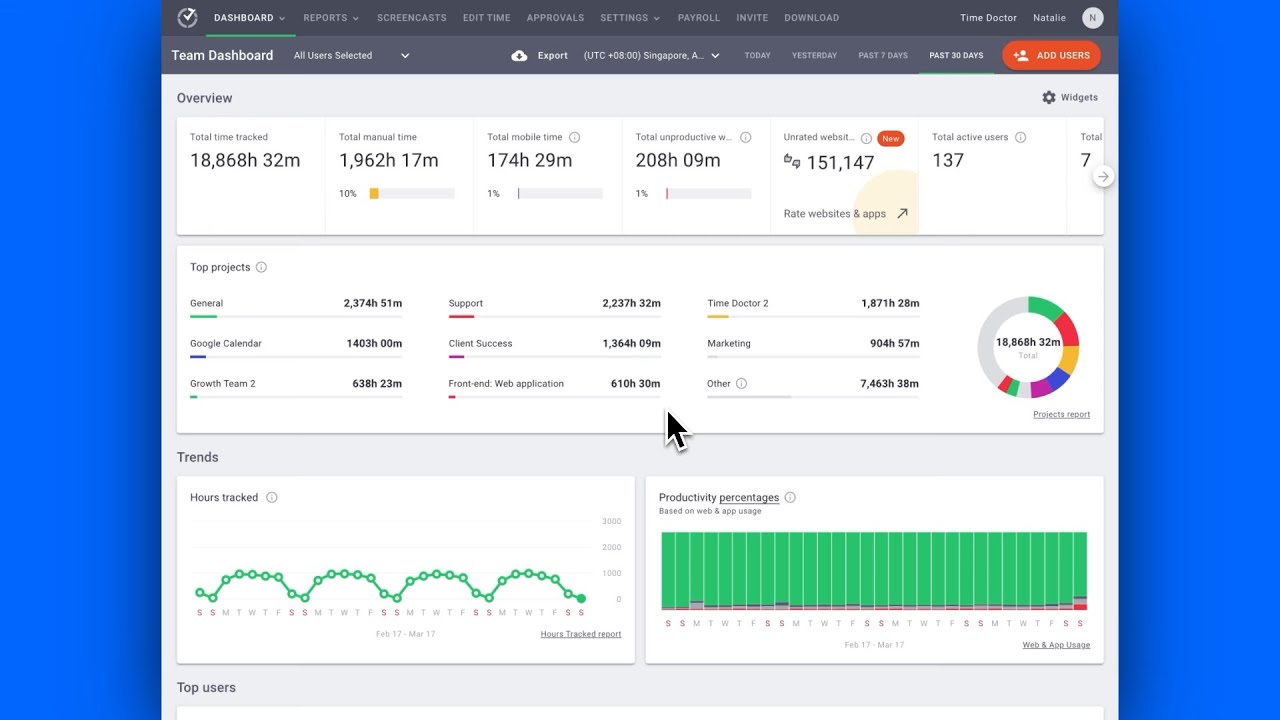
Comprehensive reports showcase time usage, employee activity, and project allocation. These insights help managers identify workflow inefficiencies, enhance resource allocation, and boost productivity across departments without relying solely on manual updates or status meetings.

App Integrations

Time Doctor integrates with popular apps like Asana, Trello, Slack, and Jira. This ensures seamless collaboration across tools and allows employees to continue using their favorite project management apps within a unified system.

Offline Tracking

Even without internet access, Time Doctor records time and work data. Once reconnected, all information syncs automatically, making it reliable for workers in remote or low-connectivity areas where continuous tracking is otherwise difficult.

Team Management

Managers can easily assign tasks, set deadlines, and monitor work progress. Time Doctor enhances accountability within distributed teams, allowing leaders to balance workloads, prevent burnout, and ensure timely project deliveries without constant check-ins.

Time Doctor Features – What You Get?

Time Doctor features include time tracking, reporting, integrations, and monitoring options. It is built to enhance workplace productivity for both freelancers and large enterprises. With flexible settings and detailed reports, managers gain actionable insights.

  • Easy Time Tracking
  • Detailed Productivity Reports
  • Optional Screen Monitoring
  • Client Billing Tools
  • Offline Time Recording
  • Project Task Management
  • Real-Time Data Access
  • Seamless App Integrations
  • Learning Curve Issues
  • Privacy Concerns Raised
  • Limited Free Version
  • Requires Strong Connectivity

Video Guides and Tutorials

Time Doctor provides extensive video tutorials for onboarding and advanced usage. These tutorials simplify learning for new users, covering features like setup, task tracking, and reports. They also guide managers in using integrations with third-party apps. With step-by-step instructions, even beginners can quickly adapt. Businesses benefit from accessible resources that reduce training time and improve adoption across teams.

Time Doctor time tracking video 1
Time Doctor time tracking video 2
Time Doctor time tracking video 3
Time Doctor time tracking video 4

Time Doctor Pricing Plans

Time Doctor offers three time tracking and workforce analytics plans, with annual billing saving roughly 16% (two months free). A 14-day free trial covers all features with no credit card required.

  • Basic: $6.67/user/month (annual) or $8/user/month (monthly) — time tracking, web & app usage, task management, unlimited screenshots, projects & tasks, basic reporting
  • Standard: $11.67/user/month (annual) or $14/user/month (monthly) — 60+ integrations, payroll & invoicing, video screen recording, online reports, productivity ratings, work-life balance widgets
  • Premium: $16.70/user/month (annual) or $20/user/month (monthly) — client login access, VIP support, executive dashboards, unlimited groups & departments, SSO, video screen recording (full)
  • Enterprise: Custom pricing — dedicated CSM, custom integrations, white-label deployment, SAML SSO, advanced security audit, custom contract, SLA

All plans include unlimited screenshots, real-time tracking, automatic time tracking, project profitability, and 60+ native integrations (Asana, Trello, Jira, GitHub, Salesforce, QuickBooks, etc.). Prorated billing applies to mid-cycle user additions. Volume discounts available for 50+ users, and a 14-day free trial requires no card.

Top Time Doctor Services

Time Doctor Review: Pros, Cons & Comparison

Pros and Cons of Time Doctor

Pros:

  • ✅ Accurate time tracking with detailed website and app usage reports
  • ✅ Distraction alerts that nudge users back to focused work
  • ✅ Screenshots included on all plans with no monthly cap
  • ✅ Strong productivity analytics, client logins, and invoicing
  • ✅ Wide range of integrations with project and payroll tools

Cons:

  • ❌ Monitoring features can raise employee privacy concerns
  • ❌ Has a learning curve for new admins and teams
  • ❌ Most advanced reporting and integrations require higher tiers
  • ❌ Can feel heavy for teams that only need simple time tracking

Time Doctor vs Hubstaff

Time Doctor and Hubstaff are both leading time-tracking and productivity-monitoring tools, but they lean in different directions. Time Doctor starts at about $6.67 per user per month (annual) for Basic, rising to $11.67 for Standard and $16.70 for Premium, and is strongest for detailed desktop productivity insight — website and app tracking, distraction alerts, and screenshots on every plan with no monthly cap, plus client logins and invoicing. Hubstaff is more affordable at the entry level, from about $4.99 per seat per month (annual) for Starter up to $10 for Team, and stands out for GPS tracking, geofencing, and field-team management, making it a better fit for construction, cleaning, and mobile workforces. In short, choose Time Doctor for deep desktop productivity analytics, and Hubstaff for field and location-based teams or a lower starting price.

4.5 EASE OF USE
4.0 VALUE FOR MONEY
4.5 CUSTOMER SUPPORT
5.0 FUNCTIONALITY

Alternatives

Time Doctor stands out as the best choice among productivity tools due to its accurate time tracking, detailed reporting, app integrations, and offline tracking. Popular alternatives include Hubstaff, Toggl Track, and RescueTime. Explore some alternatives to see which aligns best with your workflow and business requirements.


WordPerfect Review

WordPerfect Review

Editorial rating: 4.3 / 5
Explore More
iMyFone Review

iMyFone Review

Editorial rating: 4.5 / 5
Explore More
Freedom Review

Freedom Review

Block distracting websites and apps across all your devices
Explore More
OnlyOffice Review

OnlyOffice Review

Editorial rating: 4.4 / 5 — Open-source office suite with docs, spreadsheets, slides and real-time collaboration
Explore More
Clockify Review

Clockify Review

Editorial rating: 4.7 / 5 — Free unlimited time tracker for teams — timesheets, project tracking and billable hours
Explore More
Fabric.so Review

Fabric.so Review

Fabric.so Review – AI Workspace & Second Brain That Auto-Organizes Everything
Explore More
RescueTime Review

RescueTime Review

RescueTime Review – Automatic Time Tracking & Focus Tool for Knowledge Workers
Explore More
Authory Review

Authory Review

Editorial rating: 4.8 / 5
Explore More
VisualCV Review

VisualCV Review

Editorial rating: 4.6 / 5
Explore More
Toggl Track Review

Toggl Track Review

Editorial rating: 4.6 / 5
Explore More
Parallels Review

Parallels Review

Editorial rating: 4.5 / 5
Explore More
One Click Root Review

One Click Root Review

Editorial rating: 4.4 / 5
Explore More
Awesome Screenshot Review

Awesome Screenshot Review

4.6
Explore More
Reclaim AI Review

Reclaim AI Review

Editorial rating: 4.3 / 5
Explore More
Todoist Review

Todoist Review

Editorial rating: 4.6 / 5
Explore More
ClickUp Review

ClickUp Review

Editorial rating: 4.7 / 5
Explore More
DeskTime Review

DeskTime Review

Editorial rating: 4.5 / 5
Explore More
Any.do Review

Any.do Review

Editorial rating: 4.6 / 5
Explore More
2Captcha Review

2Captcha Review

4.4
Top Rated Features
  1. Easy Task Automation
  2. Integration Flexibility
  3. Real-Time Data Management
Explore More
Cake.com Review

Cake.com Review

4.2
Top Rated Features
  1. All-in-one solution
  2. Easy integration
  3. Team collaboration
Explore More
Toggl track Review

Toggl track Review

4.7
Top Rated Features
  1. Easy Start and Stop
  2. Project and Client Tags
  3. Clear and Simple Reports
Explore More
Nimbus Review

Nimbus Review

4.7
Top Rated Features
  1. Task Management
  2. Document Collaboration
  3. Cloud Storage
Explore More
Splashtop Review

Splashtop Review

4.8
Top Rated Features
  1. High-Performance Remote Access
  2. Cross-Platform Support
  3. Affordable Pricing
Explore More
Duet Display Review

Duet Display Review

4.8
Top Rated Features
  1. Supports Mac and Windows
  2. Smooth Performance with Low Latency
  3. Adjustable Resolution and Frame Rate
Explore More
Taskade Overview

Taskade Overview

4.7
Top Rated Features
  1. Built-In Mind Mapping Tool
  2. AI Assistant for Task Management
  3. Voice and Video Chat Integration
Explore More
Stardock Review

Stardock Review

4.8

Top rated Features

  1. Customizable Fences
  2. Theme Customization
  3. Automatic Grouping
Explore More
PDF Expert Review

PDF Expert Review

4.7
Top Rated Features
  1. Seamless Editing
  2. Advanced Annotation
  3. Form Filling Support
Explore More
Shift Review

Shift Review

3.9
Top Rated Features
  1. Microsoft Apps
  2. All Apps In One Hub
  3. Google Services
Explore More
FAQs

Frequently Asked Questions

Time Doctor is a powerful productivity tool, and many users have questions before choosing it. At Idealonlinebusiness, we offer answers to all your queries, making it easier to understand its key features and usage.

Time Doctor is a time-tracking and productivity software designed to improve efficiency for individuals and teams. A detailed time doctor review highlights how it monitors work hours, tasks, and app usage to boost productivity.

Time Doctor pricing depends on the plan you choose. Basic plans start at $7/month, while Premium plans offer advanced reporting and features at $20/month. Time doctor review articles often praise the transparent pricing structure.

Time Doctor features include time tracking, productivity reports, integrations, and offline tracking. According to many time doctor review sources, these features help managers and freelancers streamline work and monitor performance efficiently.

Yes, popular time doctor alternative options include Hubstaff, Toggl Track, and RescueTime. While these tools offer similar tracking, a Time Doctor review often points out that Time Doctor benefits in reporting and task management are superior.

Time Doctor vs Hubstaff differs mainly in reporting and offline tracking. Hubstaff focuses more on GPS tracking for field teams. In most time doctor review comparisons, Time Doctor excels in productivity analytics and desktop tracking features.

The Pros and Cons of Time Doctor include accurate tracking, app integrations, and productivity analytics as advantages. Limitations may include learning curve challenges and privacy concerns. Time doctor review articles show the benefits outweigh the drawbacks.

Time Doctor benefits include improved productivity, better accountability, and efficient team management. A time doctor review highlights that businesses gain insights into work patterns and reduce wasted hours effectively using the software.

Yes, Time Doctor tracks hours worked on specific tasks or projects, generating accurate invoices. Many time doctor review sources emphasize how this feature improves billing transparency and saves time for freelancers and agencies.

Yes, Time Doctor provides video guides and tutorials that cover setup, task tracking, and reporting. According to a time doctor review, these resources make it easier for new users to adopt the platform efficiently.

Time Doctor review and comparison time doctor vs hubstaff articles show it is ideal for teams and individuals who want detailed reports, offline tracking, and integrations. While alternatives exist, Time Doctor benefits make it a top choice.

⚠️ Affiliate Disclosure: This site contains affiliate links. We may earn a commission when you purchase through our links at no extra cost to you. Results are not typical.