Copy this code and paste it at checkout on Retouch4me
Step 1: Copy the code above. Step 2: Redeem & paste it in the promo box at Retouch4me's checkout.
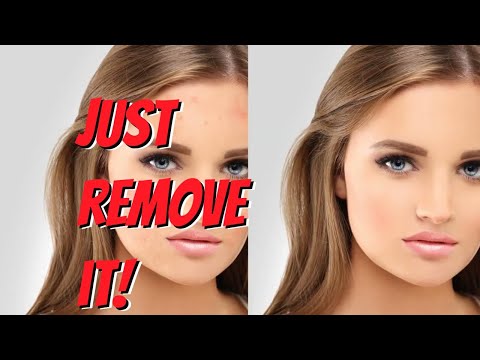
Retouch4me is an Estonian company that makes AI-powered photo retouching plugins trained on professionally retouched images. The plugins run inside Adobe Photoshop and also as standalone apps, with workflows for Lightroom and Capture One. Each desktop plugin is a one-time purchase that processes unlimited images offline, and there is a cloud option billed per retouch. Our Retouch4me discount code OnlineBusiness20 takes 20% off.
Heal, Dodge and Burn and Skin Tone plugins keep natural skin texture.
Buy each plugin once and process unlimited images offline.
Pay per image with access to many plugins, with free starter retouches.
Run plugins across whole shoots instead of editing photo by photo.
Output lands on editable layers so you keep full control.
AI plugins for skin retouching and color matching on video.
Task-specific AI plugins, layered non-destructive output, batch processing, offline use with no image limits on owned plugins, and a pay-per-retouch cloud panel for lighter workloads.
The OnlineBusiness20 code applies when you buy Retouch4me products through our link.
Retouch4me offers one-time plugin purchases for unlimited offline retouching in Photoshop, or cloud subscriptions billed in retouching credits. A free trial pack of 20 cloud retouches lets you test it first.
One-time purchase of the AI photo plugin collection, on sale from $101.50 at the time of writing.
One-time purchase of the AI video plugins, on sale from $86.80 at the time of writing.
200 retouching credits per month, or $169 billed yearly ($14.08/month) for 2,400 credits a year.
500 retouching credits per month, or $299 billed yearly ($24.92/month) for 6,000 credits a year.
1,500 retouching credits per month, or $759 billed yearly ($63.25/month) for 18,000 credits a year.
20 free cloud photo retouches, plus the free Frequency Separation and Color Match plugins.
Note: Prices were checked on retouch4.me in October 2026. Our discount code OnlineBusiness20 takes a further 20% off.
Here’s a quick summary of what photographers praise and criticize about Retouch4me.
Alternatives include Evoto for all-in-one portrait retouching, Imagen for Lightroom culling and editing, and Luminar Neo for AI-assisted general photo editing. Retouch4me stands out for task-specific plugins that you own outright.

Erase.bg is a free AI-powered background removal service from Pixelbin.io that removes image backgrounds in seconds with one click. In this Erase.bg review by IdealOnlineBusiness.com, we look at its pricing, output quality, features, and ease of use based on public Trustpilot, G2, and Product Hunt reviews. Whether you are an e-commerce seller, content creator, designer, or marketer, Erase.bg provides fast, professional background removal at scale with batch processing and API access.
Our analysis of Erase.bg background remover reviews shows the platform is trusted for high-quality results, free usage, and fast processing. It holds a 4.8/5 rating on Trustpilot across 4,500+ reviews. Users praise the precise edge detection on hair, fur, and fine details, free high-resolution downloads, and quick batch processing. For e-commerce product photos, profile pics, and marketing visuals, Erase.bg is one of the best free background removers.
Explore More
Photo AI is an AI-powered photo generator that lets you create studio-quality professional photos of yourself without ever hiring a photographer. In this Photo AI review by IdealOnlineBusiness.com, we look at its pricing, photo realism, features, and ease of use based on public Product Hunt, Trustpilot, and Reddit reviews. Whether you need LinkedIn headshots, dating photos, social media content, or creative imagery, Photo AI promises lifelike results in minutes.
Our analysis of Photo AI shows the platform is widely trusted for photorealistic AI photo generation and creative versatility. It holds a 4.5/5 rating across user reviews and has been featured on Product Hunt as a top product. Users praise the realism, costume changes, scene variety, and quick training, while some flag occasional facial inconsistency in complex poses. For anyone wanting affordable professional photos, Photo AI is a strong choice.
Explore More
Imagine Art is an AI-powered image generation platform that transforms your text prompts into high-quality images, illustrations, art, and visuals in seconds. In this Imagine Art review by IdealOnlineBusiness.com, we look at its pricing, features, model quality, and ease of use based on public G2, Trustpilot, and Capterra reviews. Whether you’re a digital artist, social media manager, e-commerce seller, or marketer, Imagine Art promises studio-quality visuals without hiring a designer.
Our analysis of Imagine Art AI reviews shows the platform is trusted for its photorealistic output, style diversity, and speed. It holds a 4.6/5 rating on G2 across 2,500+ reviews. Users praise the one-click art generation, anime mode, image-to-image transformations, and the inpainting/outpainting features. Some flag occasional content moderation strictness. For creators who want fast, high-quality AI art without design skills, Imagine Art is a strong option.
Explore More

Answers about the Retouch4me discount code, pricing and features.
⚠️ Affiliate Disclosure: This site contains affiliate links. We may earn a commission when you purchase through our links at no extra cost to you. Results are not typical.