Pixelbin is an AI-powered image and video management platform built for e-commerce stores, marketing teams, and creative agencies that need to store, optimize, transform, and deliver visual assets at scale. In this Pixelbin review by IdealOnlineBusiness.com, we look at its pricing, features, real user feedback, and ease of use based on G2, Capterra, and Product Hunt reviews. Whether you’re an e-commerce merchant managing thousands of product images, a marketing team running campaigns, or a developer building a media-heavy product, Pixelbin promises a unified DAM, AI image editing, and a global CDN delivery layer.
Our analysis of Pixelbin reviews shows the platform is widely praised for its AI editing tools, fast image delivery, and developer-friendly URL-based transformations. It is well reviewed on the major software listing sites, with users calling out the background removal, AI upscaling, and watermark removal features as standout capabilities. For brands and developers that want a single platform to host, transform, and deliver visual content, Pixelbin combines DAM, image editing, and CDN in a way that few competitors match.
Remove backgrounds, upscale low-res images, retouch portraits, and enhance product shots with one-click AI-powered tools built for e-commerce and marketing teams.
Organize, tag, and share thousands of images and videos with team folders, role-based permissions, and powerful search across your entire visual library.
Resize, crop, format, and apply AI effects on the fly using simple URL parameters so developers can deliver perfect images without managing variants manually.
Pixelbin’s built-in CDN delivers images globally with auto WebP/AVIF format, smart compression, and lazy loading for faster page speeds and better SEO.
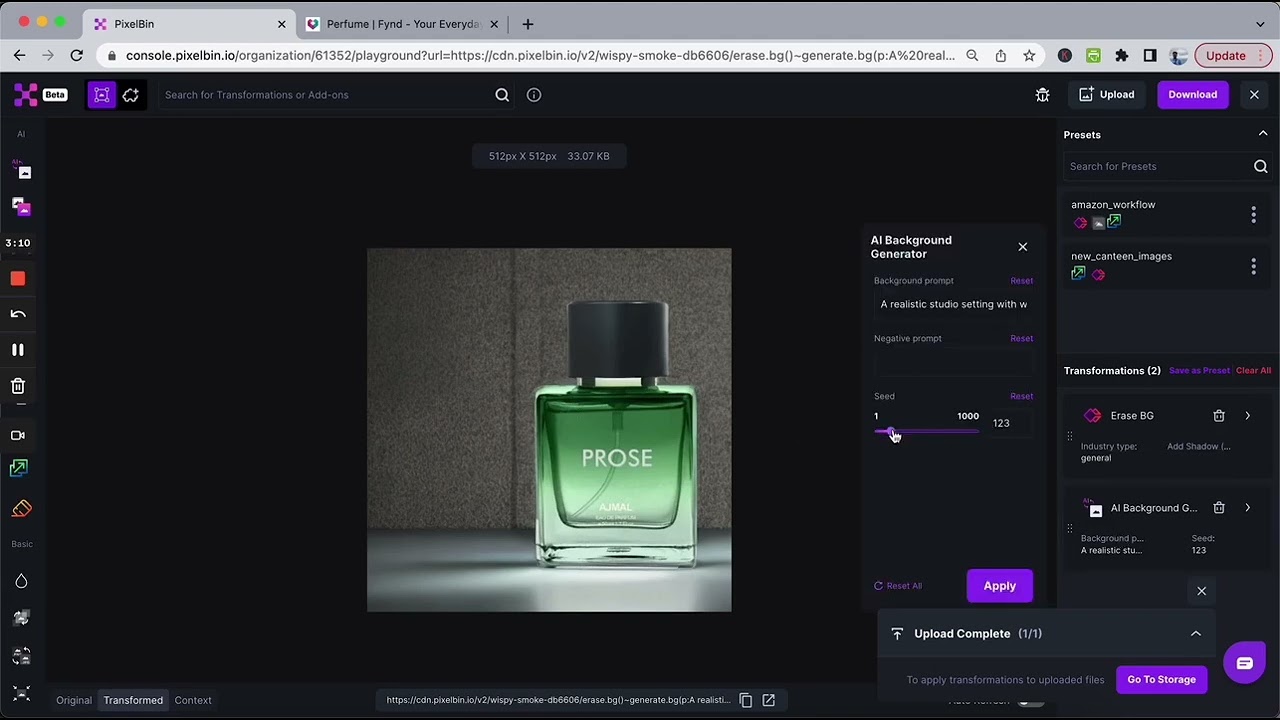
Run advanced AI tasks like background removal, watermark removal, and unwanted object erase in seconds without leaving the platform or using Photoshop.
Apply transformations and AI effects across thousands of images at once with bulk editing tools and reusable automation workflows for catalog teams.
Comprehensive REST API, SDKs for popular languages, and integrations with Shopify, WordPress, and headless commerce platforms make Pixelbin easy to embed.
Pay only for what you use with transparent Pipedream subscription cost, ideal for startups and enterprises alike.
Pixelbin’s combination of AI image editing, digital asset management, URL-based transformations, and global CDN delivery makes it a strong choice for e-commerce stores and marketing teams that want one platform to host, optimize, and deliver visual content at scale.
See how Pixelbin helps e-commerce brands, marketing teams, and developers manage, edit, and deliver images and videos at scale with AI-powered editing, DAM, URL transformations, and a fast global CDN.
Pixelbin is more than a CDN, it packages a full suite of visual content services aimed at e-commerce brands, marketing teams, and developers. From AI image editing and digital asset management to URL-based transformations, global CDN delivery, and bulk automation, Pixelbin’s services unite the tools brands traditionally piece together from multiple vendors into one streamlined platform.
Pipedream pricing is based on usage, with flexible tiers for individuals, small teams, and enterprises. The Free plan includes limited executions, while professional Pipedream subscription tiers unlock advanced features. Higher Pipedream pricing plans offer users scalable workflows, team collaboration, and best support. The Pipedream subscription cost is competitive, with monthly and annual billing options for predictable expenses.
Read More: Claid AI review | remove.bg review | Erase.bg review | Clipping Magic review
PixelBin uses usage-based pricing that scales with your needs:
Exact prices depend on your usage, so check PixelBin’s pricing page for a current quote.

If you’re comparing image management and optimization platforms, popular PixelBin alternatives include Cloudinary and imgix for enterprise media delivery, ImageKit for real-time optimization and DAM, Uploadcare for upload and processing pipelines, and Bynder for brand asset management. Each varies on pricing, transformation features, AI tools and CDN performance, so compare based on your image volume and use case.

Use the Retouch4me discount code OnlineBusiness20 at checkout to take 20% off Retouch4me AI retouching plugins. It is a partner code issued to IdealOnlineBusiness.com.

Erase.bg is a free AI-powered background removal service from Pixelbin.io that removes image backgrounds in seconds with one click. In this Erase.bg review by IdealOnlineBusiness.com, we look at its pricing, output quality, features, and ease of use based on public Trustpilot, G2, and Product Hunt reviews. Whether you are an e-commerce seller, content creator, designer, or marketer, Erase.bg provides fast, professional background removal at scale with batch processing and API access.
Our analysis of Erase.bg background remover reviews shows the platform is trusted for high-quality results, free usage, and fast processing. It holds a 4.8/5 rating on Trustpilot across 4,500+ reviews. Users praise the precise edge detection on hair, fur, and fine details, free high-resolution downloads, and quick batch processing. For e-commerce product photos, profile pics, and marketing visuals, Erase.bg is one of the best free background removers.
Explore More
Photo AI is an AI-powered photo generator that lets you create studio-quality professional photos of yourself without ever hiring a photographer. In this Photo AI review by IdealOnlineBusiness.com, we look at its pricing, photo realism, features, and ease of use based on public Product Hunt, Trustpilot, and Reddit reviews. Whether you need LinkedIn headshots, dating photos, social media content, or creative imagery, Photo AI promises lifelike results in minutes.
Our analysis of Photo AI shows the platform is widely trusted for photorealistic AI photo generation and creative versatility. It holds a 4.5/5 rating across user reviews and has been featured on Product Hunt as a top product. Users praise the realism, costume changes, scene variety, and quick training, while some flag occasional facial inconsistency in complex poses. For anyone wanting affordable professional photos, Photo AI is a strong choice.
Explore More
Imagine Art is an AI-powered image generation platform that transforms your text prompts into high-quality images, illustrations, art, and visuals in seconds. In this Imagine Art review by IdealOnlineBusiness.com, we look at its pricing, features, model quality, and ease of use based on public G2, Trustpilot, and Capterra reviews. Whether you’re a digital artist, social media manager, e-commerce seller, or marketer, Imagine Art promises studio-quality visuals without hiring a designer.
Our analysis of Imagine Art AI reviews shows the platform is trusted for its photorealistic output, style diversity, and speed. It holds a 4.6/5 rating on G2 across 2,500+ reviews. Users praise the one-click art generation, anime mode, image-to-image transformations, and the inpainting/outpainting features. Some flag occasional content moderation strictness. For creators who want fast, high-quality AI art without design skills, Imagine Art is a strong option.
Explore More
Have questions about Pipedream and its alternatives? Here we answer the most common queries to help you understand features, pricing, and comparisons before choosing the right tool.
⚠️ Affiliate Disclosure: This site contains affiliate links. We may earn a commission when you purchase through our links at no extra cost to you. Results are not typical.