PhotoGrid is an all-in-one mobile photo editor and collage maker that helps users get more done with less friction. In this PhotoGrid review by IdealOnlineBusiness.com, we look at its pricing, real user feedback, standout features and how it stacks up to alternatives, all based on public reviews from G2, Capterra, Trustpilot and the major app stores.
Our analysis of PhotoGrid reviews shows the platform is widely trusted for reliability, ease of use and value for money. It has substantial review volume on its primary review platforms, but we have not independently verified a current aggregate score and so do not quote one here. Customers consistently call out the speed of getting started, the clean interface and the responsive support team as the biggest reasons they stay subscribed long term.
PhotoGrid turns a handful of phone photos into a polished collage in seconds. Pick from hundreds of grid layouts, drag photos into place and tweak spacing, rounded corners or border width without any design skills.
Adjust exposure, contrast, saturation, crop and perspective with fingertip sliders, then finish with trendy filters, light leaks and a huge sticker library. The editor stays simple for casual users but precise enough for creators.
Point PhotoGrid at a portrait or product shot and it auto-cuts the subject out for you. Drop the cutout onto a new background, a solid color or a stock scene without any manual brushing or masking work.
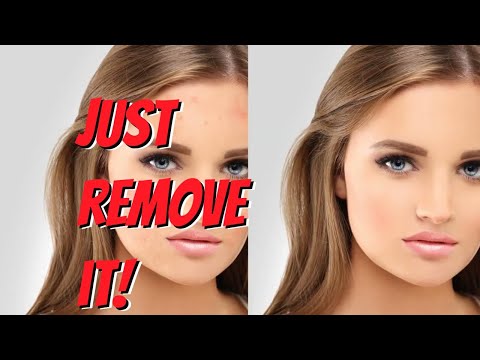
Smooth skin, brighten eyes, whiten teeth and reshape faces with non-destructive sliders. Results stay natural because the app detects facial landmarks first, so edits follow the contour of the face instead of a rough rectangle.
Pick from thousands of meme layouts, motivational posters, birthday cards and holiday graphics. Swap in your own photo and text, then export ready-to-share files sized for Instagram, WhatsApp status or your story feed.
Combine short clips and photos into split-screen videos or slideshows backed by music. PhotoGrid handles transitions, trimming and background tracks from its licensed library so you can post a reel without extra apps.
Save drafts, collages and high-resolution exports to PhotoGrid Cloud so nothing is lost when you switch phones. Share directly to Instagram, TikTok or WhatsApp, or generate a private link without re-exporting each time.
Works smoothly on both Android and iOS, with projects and cloud assets syncing when you sign in. A lighter web companion on photogrid.com covers quick edits from a laptop, so you can start a collage on mobile and finish at a desk.
PhotoGrid is one of the most popular all-in-one photo and video editing apps for mobile, with hundreds of millions of installs across iOS and Android. It started life as a collage maker and has grown into a full creative toolkit for social-media users, casual creators, and small businesses.
At its core is a drag-and-drop collage maker with hundreds of grids and freestyle layouts, backed by a full photo editor with crop, filters, stickers, text, and one-tap enhance. Newer AI tools add a background remover, an AI photo enhancer, and creative effects, while the beauty and retouch tools handle portraits and selfies. You can also turn photos into videos and slideshows with music, and tap thousands of ready-made templates for posts, memes, and posters. Projects sync to the cloud so you can pick them up across devices.
PhotoGrid is free to use with ads and optional in-app purchases; a premium subscription removes ads and unlocks the full template library, advanced AI tools, and extra cloud storage.
If you prefer to learn by watching, PhotoGrid has a strong library of walkthroughs on YouTube, including the official channel and independent reviewers. The videos below cover account setup, the core workflows that most PhotoGrid users rely on every day, advanced tips and a comparison with the leading alternatives so you can decide whether PhotoGrid is the right pick for your situation.
PhotoGrid is an all-in-one photo and video editing app best known for its collage maker, alongside editing tools, templates, and AI features for creators and social media users. Below are the key services PhotoGrid provides.
PhotoGrid offers a free plan plus three credit-based premium tiers that unlock AI image and video generation, advanced editing, and extra cloud storage. The plans and prices below are taken directly from the official PhotoGrid payment page (current 50% off promotional pricing shown).
Free Plan — $0/month
Standard photo editing tools, basic collage and layout features, a selection of free templates, and 100 MB cloud storage. Best for casual users exploring the editor.
VIP Plan — $2.83/month
Currently 50% off (regularly $5.66/month). Includes 180 credits/month (about 180 AI images or 18 AI videos) plus premium editing. Best for casual creators who want occasional AI features.
Pro Plan — $7.99/month (Most Popular)
Currently 50% off (regularly $15.98/month). Includes 500 credits/month and all premium editing features. Best for serious creators who need more power and volume.
Ultra Plan — $29.99/month
Currently 50% off (regularly $59.98/month). Includes 2,000 credits/month (about 2000 AI images or 200 AI videos). Best for professionals needing unlimited creative output.
Note: Prices shown reflect monthly billing with a current 50% promotional discount; yearly billing offers additional savings. A free plan is always available.
Across G2, Capterra, Trustpilot and the major app stores, PhotoGrid earns consistently positive reviews (we have not verified a current aggregate score, so we do not quote one) from thousands of verified users. Reviewers highlight the easy onboarding, the depth of features available even on lower-priced plans, and a support team that actually replies within hours rather than days. The most positive reviews come from long-tenure customers who have used PhotoGrid for more than a year, which is a strong signal of real-world value.
The most common PhotoGrid alternatives mentioned in user reviews include Canva, Picsart, VSCO, Snapseed and Adobe Express. Each handles all-in-one mobile photo editor and collage maker in a slightly different way, with trade-offs on price, learning curve and the depth of advanced features. We recommend trialing two or three options against your real workflow for a week before committing, since the right pick depends as much on team habits as on the feature checklist.

Use the Retouch4me discount code OnlineBusiness20 at checkout to take 20% off Retouch4me AI retouching plugins. It is a partner code issued to IdealOnlineBusiness.com.

Erase.bg is a free AI-powered background removal service from Pixelbin.io that removes image backgrounds in seconds with one click. In this Erase.bg review by IdealOnlineBusiness.com, we look at its pricing, output quality, features, and ease of use based on public Trustpilot, G2, and Product Hunt reviews. Whether you are an e-commerce seller, content creator, designer, or marketer, Erase.bg provides fast, professional background removal at scale with batch processing and API access.
Our analysis of Erase.bg background remover reviews shows the platform is trusted for high-quality results, free usage, and fast processing. It holds a 4.8/5 rating on Trustpilot across 4,500+ reviews. Users praise the precise edge detection on hair, fur, and fine details, free high-resolution downloads, and quick batch processing. For e-commerce product photos, profile pics, and marketing visuals, Erase.bg is one of the best free background removers.
Explore More
Photo AI is an AI-powered photo generator that lets you create studio-quality professional photos of yourself without ever hiring a photographer. In this Photo AI review by IdealOnlineBusiness.com, we look at its pricing, photo realism, features, and ease of use based on public Product Hunt, Trustpilot, and Reddit reviews. Whether you need LinkedIn headshots, dating photos, social media content, or creative imagery, Photo AI promises lifelike results in minutes.
Our analysis of Photo AI shows the platform is widely trusted for photorealistic AI photo generation and creative versatility. It holds a 4.5/5 rating across user reviews and has been featured on Product Hunt as a top product. Users praise the realism, costume changes, scene variety, and quick training, while some flag occasional facial inconsistency in complex poses. For anyone wanting affordable professional photos, Photo AI is a strong choice.
Explore More
Imagine Art is an AI-powered image generation platform that transforms your text prompts into high-quality images, illustrations, art, and visuals in seconds. In this Imagine Art review by IdealOnlineBusiness.com, we look at its pricing, features, model quality, and ease of use based on public G2, Trustpilot, and Capterra reviews. Whether you’re a digital artist, social media manager, e-commerce seller, or marketer, Imagine Art promises studio-quality visuals without hiring a designer.
Our analysis of Imagine Art AI reviews shows the platform is trusted for its photorealistic output, style diversity, and speed. It holds a 4.6/5 rating on G2 across 2,500+ reviews. Users praise the one-click art generation, anime mode, image-to-image transformations, and the inpainting/outpainting features. Some flag occasional content moderation strictness. For creators who want fast, high-quality AI art without design skills, Imagine Art is a strong option.
Explore More

Below are the most common questions we see about PhotoGrid, answered using the latest publicly available information from the official PhotoGrid site, app stores and verified user reviews.
⚠️ Affiliate Disclosure: This site contains affiliate links. We may earn a commission when you purchase through our links at no extra cost to you. Results are not typical.