⚠️ Affiliate Disclosure: This page contains affiliate links. We may earn a commission at no extra cost to you. This does not influence our reviews. Read full disclosure →

Coohom Review

icon01

Coohom Review

4.4 (2,117)

Coohom Overview

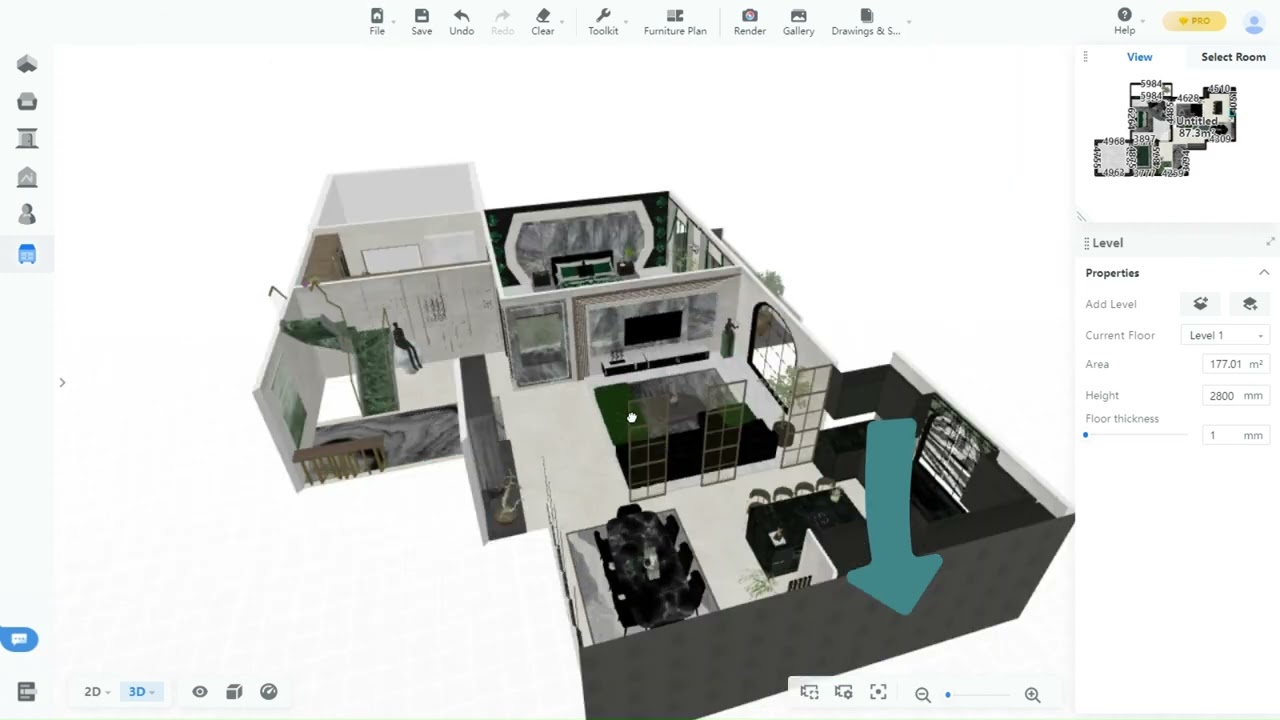
Coohom is a powerful 3D interior design software offering advanced visualization, rendering, and modeling capabilities for designers, architects, and real estate professionals. It enables users to create realistic home and commercial layouts with minimal effort. From drag-and-drop features to immersive AR/VR experiences, Coohom combines technology with creativity. At Idealonlinbusiness, we provide detailed tool reviews, helping businesses and professionals choose the right solutions for their growth. This in-depth coohom review covers its features, pricing, pros and cons, comparisons, and alternatives so you can decide whether it fits your design needs.

Easy User Interface

The platform offers an easy-to-use interface for designers at any level. From beginners to professionals, users can navigate tools quickly, saving time and avoiding steep learning curves, ensuring faster project delivery with consistent quality.

Realistic Renderings

Its advanced rendering technology creates lifelike visuals that impress clients. Designers can showcase work with stunning details, from lighting effects to textures, boosting client confidence while improving project approval rates in competitive design markets.

Cloud-Based Access

Being a cloud platform, it allows design access from anywhere, anytime. This flexibility makes collaboration easier, enabling teams to share updates instantly, ensuring smooth workflows without dependency on powerful desktops or location constraints.

Vast Furniture Library

The platform offers an extensive 3D furniture and décor library. Designers gain access to thousands of customizable items, saving time on sourcing and modeling. This boosts creativity and ensures tailored solutions for client projects.

Collaboration Tools

Built-in collaboration features support teamwork, feedback, and client approvals. By streamlining communication within the platform, designers and clients stay aligned, reducing miscommunication risks and improving overall project satisfaction with smoother coordination processes.

AR/VR Experiences

AR and VR capabilities help designers present immersive walkthroughs. Clients explore spaces virtually before final approval, reducing design changes later and providing an engaging, interactive way to validate ideas and finalize decisions confidently.

Scalable Solutions

The tool adapts to freelancers, agencies, and enterprises. Small businesses benefit from affordability, while larger organizations enjoy scalability with advanced rendering power and team access, making it suitable for diverse professional needs.

Time-Saving Efficiency

Automation speeds up design processes. Features like one-click rendering, templates, and drag-and-drop reduce manual effort. This efficiency allows professionals to handle more projects simultaneously, increasing revenue opportunities and client satisfaction.

Coohom Pro Features – What Do You Get?

Coohom Pro equips users with advanced design, rendering, and collaboration options. With easy usability and powerful automation, it ensures smooth workflows for professionals. Here are the top features with pros and cons:

  • 3D Floor Plans
  • AR/VR Walkthroughs
  • Limited Free Plan
  • Smart Rendering
  • Huge Asset Library
  • No Offline Access
  • Drag-and-Drop Tools
  • Cloud Collaboration
  • Fast Processing
  • Multi-Device Access
  • Steeper Pro Learning
  • High-End Costs

Video Guides and Tutorials

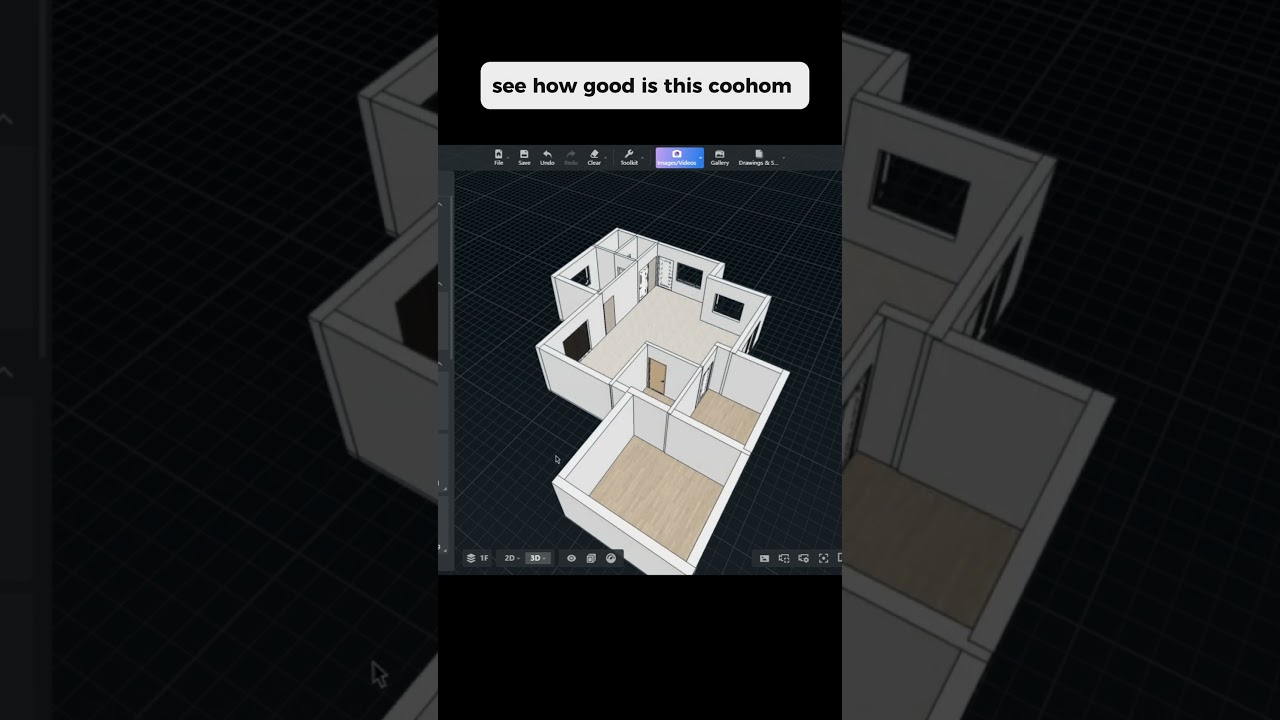
Coohom provides comprehensive video tutorials designed for both beginners and advanced users. These guides cover everything from setting up floor plans, customizing furniture, and rendering walkthroughs, to using AR/VR features effectively. The tutorials simplify learning, offering step-by-step demonstrations that shorten the onboarding process. For professionals, advanced guides explain optimization tricks, shortcut commands, and workflow hacks, making project handling more efficient. These resources ensure users maximize their investment in the tool while improving speed, confidence, and output quality for client presentations and professional portfolios.

Zootrix Tutorial
Proxy Seller Review
Liquid Web Hosting
Why Small Businesses Love DigiSigner

Best Coohom Services

Coohom services provide comprehensive design solutions for individuals, agencies, and enterprises. Covering modeling, rendering, and immersive AR/VR, the platform enhances creativity, scalability, and efficiency. With user-friendly workflows, these services streamline projects, delivering professional-quality outcomes that align with modern design needs. Many coohom review highlights about its best services.

Read More: sitechecker pro review | ecwid review | transferwise review | supermetrics review 

Coohom Price Plans

Coohom offers a freemium model with three main tiers – Free, Pro, and Enterprise – alongside special Education pricing. All plans include the drag-and-drop 3D interior design editor and core model library; higher tiers unlock faster cloud rendering and team features.

Free: $0 – basic 3D floor plan and decoration, limited model library, watermarked 2K renders, single user, ideal for hobbyists and trying out the tool.
Pro (Monthly): $29/month – full model library access, unlimited 4K cloud renders, advanced design tools, no watermark, AR/VR walkthrough export, priority cloud rendering.
Pro (Annual): $25/month billed yearly (about $299/year) – same Pro features at roughly 14% off the monthly rate; the most popular option for professional designers.
Enterprise: Custom quote (typically from $99/month per seat) – 8K rendering, team project management, custom watermarks/branding, enterprise-grade rendering speed, API and SSO integration, dedicated account manager.
Education Plan: Discounted pricing for verified students and educators – full Pro features with admin tools for classroom use; contact Coohom for current pricing.

All Pro and Enterprise plans include unlimited projects, unlimited cloud storage, and access to Coohom’s marketplace of 3D models. A 14-day free trial of Pro features is included with sign-up. Coohom regularly runs promotions for new users, especially on the annual Pro plan.

4.5 EASE OF USE
4.4 VALUE FOR MONEY
4.2 CUSTOMER SUPPORT
4.3 FUNCTIONALITY
Ravi Sharma Interior Design Consultant
Review Date: 22 July, 2024

UrbanSpace Studios
Project Type: 3D Interior Design & Visualization Tool

“Coohom is a powerful and user-friendly platform that enables interior designers and architects to create stunning 3D models and visualizations of interior spaces. Its intuitive drag-and-drop interface, extensive library of furniture and decor items, and fast rendering capabilities make it an excellent choice for professionals seeking to bring their design concepts to life quickly and efficiently. The AI-powered design feature further enhances its usability, allowing for smart layout generation and virtual walkthroughs. While the free plan offers limited features, the paid plans provide access to advanced tools and resources, making it a worthwhile investment for serious designers. Overall, Coohom stands out as a versatile and accessible solution for interior design and architectural visualization.

EASE OF USE
VALUE FOR MONEY
CUSTOMER SUPPORT
FUNCTIONALITY

Alternative

Coohom is one of the best alternatives because it balances simplicity, rendering speed, and immersive 3D design for both personal and business needs. Its affordability and user-friendly workflows make it stand out. Still, you can check other coohom alternative options like SketchUp, Planner 5D, and Roomstyler. Explore some alternatives if you want different features or plans.


Automattic Review

Automattic Review

4.4 (3,200+ reviews) on Trustpilot
Explore More
Graphy Review

Graphy Review

Best All-in-One Course Selling & LMS Platform
Explore More
StellarWP Review

StellarWP Review

Rated 4.5/5 on G2 — Powers over 600,000 WordPress sites
Explore More
Duda Review

Duda Review

Best Website Builder for Agencies & Web Professionals
Explore More
10Web Review

10Web Review

Rated 4.7/5 on G2 — AI-powered WordPress builder, hosting and automation in one platform
Explore More
Glide Review

Glide Review

Rated 4.7/5 on G2 — No-code app builder — turn Google Sheets and data into mobile and web apps in minutes
Explore More
Beaver Builder Review

Beaver Builder Review

Beaver Builder Review – Trusted by 1M+ WordPress Sites for Drag-and-Drop Page Building
Explore More
Strikingly Review

Strikingly Review

4.5 (300+ reviews) on Capterra & G2
Explore More
Adalo Review

Adalo Review

4.3/5 on G2 (6 verified reviews)
Explore More
Penji Review

Penji Review

4.7 (300+ reviews) on G2
Top Rated Features
  1. Website Builder
  2. SEO
  3. Free Hosting
Explore More
Carrd Review

Carrd Review

4.3 (2,387)
Top Rated Features
  1. Smart Website Creation
  2. Advanced Design Flexibility
  3. Content Planning with Templates
Explore More
Themify Review

Themify Review

4.8 (2,422)
Top Rated Features
  1. Easy Website Creation
  2. Pre-Built Templates
  3. Integrations and Add-ons
Explore More
Paperpal Review

Paperpal Review

4.3 (2,089)
Top Rated Features
  1. Easy Writing Assistance
  2. Advanced Editing Features
  3. AI-Powered Suggestions
Explore More
Onepage Review

Onepage Review

4.7 (2,999)
Top Rated Features
  1. Global Server Coverage
  2. Fast and Secure Proxy Setup
  3. Smart IP Rotation and Control
Explore More
Webflow Review

Webflow Review

4.2 (2,090)
Top Rated Features
  1. Visual Design Freedom
  2. CMS Integration
  3. SEO-Friendly
Explore More
Framer Review

Framer Review

4.7 (2,676)
Top Rated Features
  1. Responsive Design
  2. Team Collaboration
  3. Code Export
Explore More
Gravity Forms Review

Gravity Forms Review

4.8 (2,678)
Top Rated Features
  1. Advanced Data Management
  2. Conditional Logic
  3. Integrations
Explore More
Tutor LMS Review

Tutor LMS Review

4.7 (2,915)
Top Rated Features
  1. Student Management Tools
  2. Monetization Options
  3. Seamless Integrations
Explore More
MemberPress Review

MemberPress Review

4.7 (2,888)
Top Rated Features
  1. Simple Setup and Integration
  2. Comprehensive Content Protection
  3. Automated Payments and Recurring Billing
Explore More
Slider Revolution Review

Slider Revolution Review

4.7 (2,506)
Top Rated Features
  1. Drag-and-Drop Visual Editor
  2. Pre-Designed Templates
  3. Multimedia Support
Explore More
Leadpages Review

Leadpages Review

4.9 (2,001)
Top Rated Features
  1. Drag-and-drop builder
  2. Mobile-Responsive Templates
  3. Lead Capture Forms
Explore More
PDFfiller Review

PDFfiller Review

4.7 (2,337)
Top Rated Features
  1. PDF Editing
  2. Electronic Signatures
  3. Document Conversion
Explore More
DocHub Review

DocHub Review

4.8 (2,959)
Top Rated Features
  1. Edit PDFs (text, images, forms)
  2. Cloud Storage Integration
  3. Secure sharing and Collaboration
Explore More
PDF Expert Review

PDF Expert Review

4.7 (2,771)
Top Rated Features
  1. Seamless Editing
  2. Advanced Annotation
  3. Form Filling Support
Explore More
CSSIgniter Review

CSSIgniter Review

3.7 (2,901)
Top Rated Features
  1. Large Theme Library
  2. New themes every month
  3. Money-Back Guarantee
Explore More
Site123 Review

Site123 Review

4.6 (2,582)
Top Rated Features
  1. Website Builder
  2. SEO
  3. Free Hosting
Explore More
TemplateMonster Review

TemplateMonster Review

4.5 (2,876)
Top Rated Features
  1. Wide Template Collection
  2. Easy Customization Options
  3. Plugins and Add-ons
Explore More
Ucraft Review

Ucraft Review

4.7 (2,587)
Top Rated Features
  1. Customizable Templates
  2. SEO Management
  3. Reporting/Analytics
Explore More
Webnode Review

Webnode Review

4.5 (2,876)
Top Rated Features
  1. User-Friendly Builder
  2. Safe And Reliable Hosting
  3. Responsive Templates
Explore More
FAQs

Frequently Asked questions

Coohom is a powerful 3D design tool and users may have different queries regarding the tool. At Idealonlinbusiness, we provide trusted answers on usability, coohom pricing, and coohom features, helping you decide confidently before choosing the tool.

Coohom is a 3D interior design platform that offers rendering, floor planning, and AR/VR experiences. According to many coohom review insights, it’s ideal for professionals, agencies, and businesses seeking fast, realistic, and collaborative design workflows.

Coohom pricing starts with a free plan for beginners. Pro and Enterprise tiers offer advanced rendering, AR/VR, and team features at affordable monthly rates. Annual billing provides discounts, making coohom benefits more cost-effective long-term.

Key coohom features include 3D floor planning, drag-and-drop design, vast furniture libraries, AR/VR experiences, and real-time collaboration. Users appreciate these coohom benefits, which improve productivity, streamline client approvals, and provide realistic visuals for professional presentations.

In a comparison coohom vs sketchup, Coohom emphasizes ease of use, automation, and immersive rendering, while SketchUp focuses on advanced modeling. For speed and client-ready visuals, coohom vs sketchup is often the better choice for agencies and freelancers.

Currently, Coohom is a cloud-based tool, so offline access is limited. While this is a drawback in the pros and cons of coohom, the cloud ensures faster collaboration and seamless updates across multiple devices.

Based on several coohom review insights, freelancers, design agencies, real estate professionals, and architects benefit most. Its scalability and team features ensure coohom benefits extend from solo designers to large-scale enterprises.

A coohom alternative might suit users wanting advanced modeling flexibility. Popular options include SketchUp, Planner 5D, and Roomstyler. Still, coohom review comparisons often show Coohom as more cost-effective and beginner-friendly than many coohom alternative tools.

Yes, AR and VR walkthroughs are among the standout coohom features. These immersive experiences allow clients to virtually explore spaces before finalizing designs, one of the strongest coohom benefits noted in reviews.

The pros and cons of coohom highlight fast rendering, AR/VR support, and team scalability as major advantages. Limitations include fewer offline features and slightly higher Pro plan costs. Overall, coohom review insights show benefits outweigh drawbacks.

Yes, many coohom review sources confirm its value for professionals. Despite higher coohom pricing in advanced plans, the coohom benefits—like time-saving automation, immersive presentations, and client-ready visuals—make it worthwhile. Even against a coohom alternative, it remains competitive.

⚠️ Affiliate Disclosure: This site contains affiliate links. We may earn a commission when you purchase through our links at no extra cost to you. Results are not typical.