⚠️ Affiliate Disclosure: This page contains affiliate links. We may earn a commission at no extra cost to you. This does not influence our reviews. Read full disclosure →

aiPDF Review

icon01

aiPDF Review

4.7/5 on G2 (140+ verified reviews)

aiPDF Overview

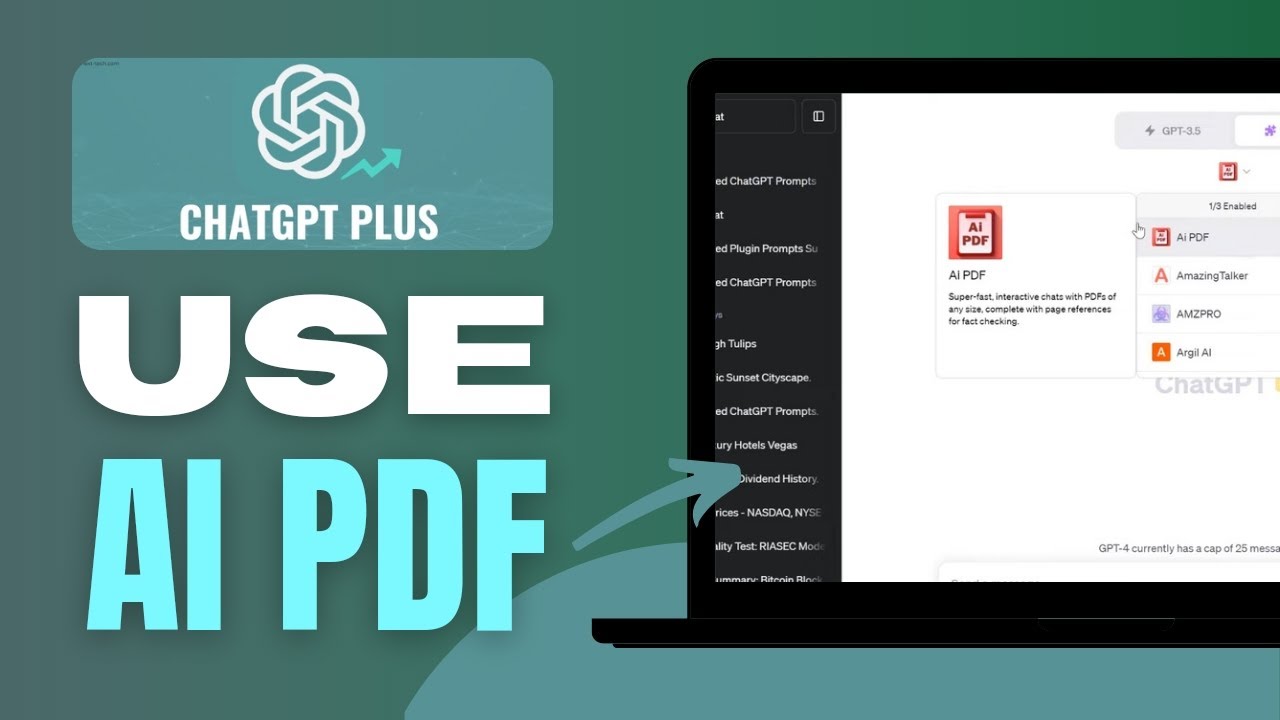
aiPDF is an AI-powered document assistant that lets you upload any PDF, Word, PowerPoint, EPUB, or scanned document and chat with it in plain English. Behind the scenes it indexes every page into a vector database, so when you ask a question it surfaces the exact paragraphs it used to answer — with page-level citations you can click to jump to the source.

Used by researchers, lawyers, students and analysts, aiPDF handles files up to 2,000 pages, works in 95+ languages, summarizes, translates and extracts tables on demand, and is rated 4.7/5 on G2. A free plan lets you chat with documents up to 50 pages; paid plans start at $11.99/month for unlimited document length and priority GPT-4-class models.

Chat with PDFs up to 2,000 Pages

Upload academic papers, contracts, textbooks or technical manuals up to 2,000 pages each. The chat interface returns answers grounded in the document with clickable page citations so you can verify every claim.

Multi-Format Support Beyond PDF

In addition to PDF, aiPDF accepts DOCX, PPTX, EPUB, RTF, TXT, Markdown and scanned images (with OCR). Mix and match file types in a single project folder.

Page-Level Citations

Every answer shows the exact source pages in the sidebar. Click a citation and the PDF scrolls directly to the highlighted paragraph — no more guessing whether the AI hallucinated.

Automatic Summaries and TL;DRs

One-click summaries of any uploaded document. Choose length (short, medium, detailed), style (bullet points, executive summary, academic abstract) and language.

95+ Language Support

Ask questions in Spanish about a German paper, or summarize a Japanese manual in English. aiPDF handles cross-language queries natively using multilingual embedding models.

Table and Data Extraction

Pull structured tables out of PDFs into CSV, Markdown or Excel formats. Especially useful for financial reports, scientific papers and medical research.

Folder & Multi-Doc Projects

Group multiple documents into folders and query them together — ideal for literature reviews, case research and multi-file comparisons. Answers cite the specific document and page.

GDPR-Compliant Document Storage

Documents are stored in encrypted EU data centers; you can delete any file permanently with one click. Paid plans offer zero-retention mode for sensitive documents.

aiPDF Pros & Cons

Pros

  • Handles documents up to 2,000 pages (most competitors cap at 300)
  • Page-level citations on every answer — no hallucination guesswork
  • 95+ language support with cross-language queries
  • Multi-document folders for literature reviews and research
  • OCR on scanned documents out of the box
  • Free plan for documents up to 50 pages
  • GDPR-compliant EU hosting with zero-retention option

Cons

  • Free plan limited to 50-page documents and a daily message cap
  • No native mobile app — web only
  • Table extraction accuracy drops on complex multi-page tables
  • Image-only PDFs rely on OCR which is slower than text PDFs
✔ Chat with any PDF up to 2,000+ pages ✔ AI summarization of long documents in seconds ✔ Citations link back to exact source pages ✔ Extract tables, figures, and key data points ✔ Multi-language support (50+ languages) ✔ Works on scanned PDFs with built-in OCR ✔ Free tier with 3 PDFs per month ✔ Affordable premium at $14.99/month ✘ Very large files (500MB+) need the pro plan ✘ Export formatting is basic ✘ No offline mode

Video Guides and Tutorials

Four curated walkthroughs covering aiPDF chat, document summarization, feature walkthrough and competitor comparison.

aiPDF — Aipdf Video Thumbnail Nrlbla0yjfa
aiPDF — Aipdf Video Thumbnail Tkyou2kitsi
aiPDF — Aipdf Video Thumbnail Wroifbv0qcu
yt aipdf-review r6VbZGzULUE

aiPDF User Review

Below is a verified G2 review from an aiPDF user in the legal research field.

4.5 EASE OF USE
4.1 VALUE FOR MONEY
3.9 CUSTOMER SUPPORT
4.4 FUNCTIONALITY
Priya S. Legal Research Associate
December 4, 2024

I deal with 500-page case bundles weekly and aiPDF has replaced 80% of the manual skimming. Drop the bundle in, ask “list all witness statements about the contract clause” and it returns citations I can verify in one click. Accuracy is far better than generic ChatGPT because it only answers from the uploaded document. Worth the $11.99 ten times over.

EASE OF USE
VALUE FOR MONEY
CUSTOMER SUPPORT
FUNCTIONALITY

aiPDF Alternatives

Closest alternatives are ChatPDF (simpler, PDF-only), Humata AI (research-focused with multi-doc querying), AskYourPDF (ChatGPT plugin + standalone), PDF.ai (similar features, smaller page cap), and NotebookLM by Google (free, multi-source, great for students). Pick aiPDF for the 2,000-page cap and page-level citations; pick NotebookLM if you need a completely free option.

AISEO Review

AISEO Review

Best AI Content & SEO Writing Assistant
Explore More
Sintra Review

Sintra Review

Rated 4.5/5 on Product Hunt — 12 pre-trained AI helpers in one suite
Explore More
Sider Review

Sider Review

Rated 4.6/5 on Chrome Web Store — 2M+ users worldwide
Explore More
Trinka AI Review

Trinka AI Review

Rated 4.6/5 on G2 — AI grammar checker built for academic, technical, scientific & medical writing
Explore More
Token Metrics Review

Token Metrics Review

Rated 4.4/5 on Trustpilot — AI-powered crypto analytics, AI ratings, trading signals & narrative detection for 6,000+ tokens
Explore More
Julius AI Review

Julius AI Review

Rated 4.6/5 on G2 — AI data analyst — upload spreadsheets, get instant charts, insights and Python-grade analysis
Explore More
WriteHuman AI Review

WriteHuman AI Review

Rated 4.5/5 on G2 — AI humanizer that bypasses AI detectors and turns ChatGPT/Claude output into natural human writing
Explore More
CustomGPT.ai Review

CustomGPT.ai Review

CustomGPT.ai Review – No-Code AI Agents Trained on Your Business Content
Explore More
Mindrift Review

Mindrift Review

Mindrift Review – Earn $15–$100+/hr Training AI as a Remote Subject-Matter Expert
Explore More
Blaze AI Review

Blaze AI Review

Fast AI Content Generation for Marketing
Explore More
AI/ML API Review

AI/ML API Review

4.7 (130+ reviews) on G2
Explore More
Blaze AI Review

Blaze AI Review

Blaze AI Review – Autopilot Marketing Content That Saves 10+ Hours a Week
Explore More
Autoblogging Review

Autoblogging Review

4-star average on Trustpilot — trusted by 40,000+ creators for one-click SEO articles
Explore More
Duckbill Review

Duckbill Review

4.7+/5 across App Store, Bustle & Fast Company — AI + human personal assistant
Explore More
Enviz Review

Enviz Review

4.7 (90+ reviews) on Product Hunt
Explore More
PromeAI Review

PromeAI Review

4.7 (350+ reviews) on Trustpilot
Explore More
Artisan Review

Artisan Review

4.6 (180+ reviews) on G2
Explore More
CometChat Review

CometChat Review

4.6 (200+ reviews) on G2
Explore More
ChatBot Review

ChatBot Review

4.4 (40+ reviews) on G2 & 4.5 on Capterra
Explore More
WordAi Review

WordAi Review

4.3 (12 reviews) on Capterra & 3.8 on G2
Explore More
Clipping Magic Review

Clipping Magic Review

4.5/5 on G2 (240 verified reviews)
Explore More
Browse AI Review

Browse AI Review

4.8/5 on G2 (530 verified reviews)
Explore More
Botsify Review

Botsify Review

4.5/5 on G2 (165 verified reviews)
Explore More
Blogify Review

Blogify Review

4.4/5 on G2 (95 verified reviews)
Explore More
AllImages AI Review

AllImages AI Review

4.5 (based on user reviews)
Explore More
Beautiful AI Review

Beautiful AI Review

4.1 (2,098)
Top Rated Features
  1. Smart Presentation Creation
  2. Advanced Design Optimization
  3. Content Planning with AI
Explore More
UNbounce Review

UNbounce Review

4.6 (2,888)
Top Rated Features
  1. Drag-and-Drop Builder
  2. Pre-Built Templates
  3. Mobile Optimization
Explore More
Hemingway Review

Hemingway Review

4.(2,090)
Top Rated Features
  1. Sentence Structure Suggestions
  2. Passive Voice Detection
  3. Formatting Tools
Explore More
Murf AI Review

Murf AI Review

4.6 (2,711)
Top Rated Features
  1. Multiple Languages
  2. Customization Options
  3. Script Editing
Explore More
Toggl track Review

Toggl track Review

4.7 (2,676)
Top Rated Features
  1. Easy Start and Stop
  2. Project and Client Tags
  3. Clear and Simple Reports
Explore More
Engagebay Review

Engagebay Review

4.6 (2,672)
Top Rated Features
  1. All-in-One Platform
  2. Email Marketing Tools
  3. CRM Capabilities
Explore More
Trendspider Review

Trendspider Review

4.7 (2,678)
Top Rated Features
  1. Multi-Timeframe Analysis
  2. Backtesting Capabilities
  3. Integration Options
Explore More
Chatbase Review

Chatbase Review

4.7 (2,678)
Top Rated Features
  1. Custom Workflows
  2. Easy Integration
  3. Security & Compliance
Explore More
Merlin Review

Merlin Review

4.6 (2,678)
Top Rated Features
  1. AI Automation
  2. Analytics & Insights
  3. Cloud Integration
Explore More
Landbot Review

Landbot Review

4.7 (2,110)
Top Rated Features
  1. Flexible Design
  2. Bot-to-Human Handover
  3. Cost-Effective Automation
Explore More
Dialpad Review

Dialpad Review

4.5 (2,1234)
Top Rated Features
  1. Unified Voice, Messaging, and Video
  2. Flexible Service Plans
  3. Intuitive, User-Friendly Dashboard
Explore More
Taskade Overview

Taskade Overview

4.7 (2,138)
Top Rated Features
  1. Built-In Mind Mapping Tool
  2. AI Assistant for Task Management
  3. Voice and Video Chat Integration
Explore More
Writesonic Review

Writesonic Review

4.9 (2,330)
Top Rated Features
  1. Blog posts & articles
  2. AI chatbots
  3. AI-generated images
Explore More
TextCortex Overview

TextCortex Overview

4.7 (2,915)
Top Rated Features
  1. AI-Powered Writing Assistant
  2. TextCortex AI Free Trial for New Users
  3. Integrated TextCortex AI Chrome Extension
Explore More
Notta Ai Review

Notta Ai Review

4.8 (2,678)
Top Rated Features
  1. Automatic Transcription
  2. Multi-Language Support
  3. Real-Time Collaboration
Explore More
FAQs

aiPDF FAQs

Common questions answered before you sign up.

aiPDF is an AI document assistant that lets you upload PDFs, Word, PowerPoint and other documents and ask questions in plain English. Answers are grounded in the document with clickable page-level citations.

Yes — a free plan lets you chat with documents up to 50 pages with a daily message limit. Paid plans start at $11.99/month for unlimited document length and priority AI models.

Up to 2,000 pages per document on paid plans — among the highest limits of any chat-with-documents tool.

Yes: PDF, DOCX, PPTX, EPUB, RTF, TXT, Markdown and scanned images via OCR.

aiPDF supports 95+ languages including cross-language queries — e.g., ask in English about a Japanese document.

Documents are stored in encrypted EU data centers with GDPR compliance. Paid plans offer zero-retention mode where files are deleted immediately after processing.

Yes — tables can be exported to CSV, Markdown or Excel. Complex multi-page or irregular tables may require manual cleanup.

There is no native mobile app yet — the web interface is mobile-responsive and works on iOS Safari and Android Chrome.

Accuracy is very high for text-based PDFs because answers are grounded in the uploaded content with citations. Accuracy drops for purely visual diagrams or low-quality OCR scans.

Yes — API access is available on higher-tier plans for programmatic document indexing and chat.

⚠️ Affiliate Disclosure: This site contains affiliate links. We may earn a commission when you purchase through our links at no extra cost to you. Results are not typical.