⚠️ Affiliate Disclosure: This page contains affiliate links. We may earn a commission at no extra cost to you. This does not influence our reviews. Read full disclosure →

Glorify Review

Glorify logo

Glorify Review

Glorify Review – Ecommerce-Focused Graphic Design Tool With Mockups, AI Background Remover & Templates

Glorify Overview

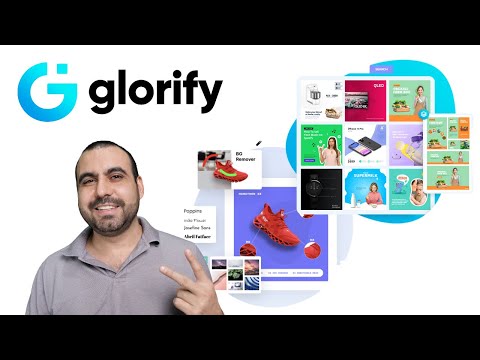
Glorify is a graphic design tool purpose-built for ecommerce business owners — Shopify, Amazon, Etsy, and DTC brands — that bundles product mockups, AI background removal, e-comm-optimized templates, image resizing, social media graphics, and a brand kit into one browser-based app. Where Canva is general-purpose, Glorify is laser-focused on the assets ecommerce sellers actually ship every week: high-converting product images, ad creatives, lifestyle mockups, social posts, and marketplace listings.

The catalog includes hundreds of e-commerce-specific templates, 3D device and packaging mockups (MacBooks, iPads, AirPods, apparel, packaging), AI image and copy generation, and one-click background removal. Pricing is approachable: a Basic tier at $19/month, a Pro tier at $32/month, and a Business tier at $97/month for larger teams, with frequent 48-hour free trial promotions on AppSumo. Reviewers consistently call out ease of use, the mockup library, and the e-commerce specialization as standout strengths.

Ecommerce-Optimized Templates

Hundreds of templates designed for product listings, Facebook/Instagram ads, Amazon A+ content, Shopify hero images, email newsletters, and marketplace banners — not generic social templates retrofitted for commerce.

Realistic 3D Product Mockups

Drop your product into MacBook, iPad, iPhone, AirPods, apparel, packaging, or bottle mockups. Build front-view, top-view, or isometric scenes to showcase products beautifully.

AI-Powered Background Remover

One-click background removal handles edges, transparent objects, and reflective surfaces — turn casual phone shots into clean marketplace-ready product photos.

AI Image Generator & Copy Assistant

Generate product images from text prompts and on-brand ad copy with the built-in AI assistant — reduce reliance on separate Midjourney + ChatGPT workflows.

One-Click Image Resizing

Convert any design to Facebook cover, Instagram post, Pinterest pin, Story, Reel, Amazon listing, and other platform-specific sizes in a single click.

Annotation & Infographic Tools

Add shadows, reflections, call-out arrows, and labels to product photos — create informative product graphics that explain features and lift conversion.

Brand Kit & Team Collaboration

Lock in your logo, fonts, color palette, and brand assets once. Team members work from the same kit; collaborators leave comments directly on design files.

48-hour free trial Often Available

Glorify routinely runs AppSumo 48-hour free trials at deep discounts (up to 93% off) — check current promotions before subscribing monthly.

Glorify Features — What You Get?

Below is a quick rundown of Glorify’s headline features. The platform’s edge is e-commerce focus — if you spend most of your design time on product images, ad creatives, and marketplace listings rather than general brand assets, Glorify will feel built for you in a way Canva does not.

Video Guides and Tutorials

Watch these hand-picked Glorify walkthroughs to see mockups, AI background removal, and ecommerce templates in action before you sign up. They cover beginner tutorials, mockup creation, and side-by-side comparisons with Photoshop.

Glorify — Gl Yt H3te7ggpfw8
Glorify — Gl Yt Phxorl7wxww
Glorify — Gl Yt H5rgvkf0mv0
Glorify — Gl Yt H3te7ggpfw8

Glorify Pricing

Glorify offers three paid tiers (Basic, Pro, Business) with a 48-hour free trial on each. All plans include the same core templates and tools; tiers differ on users, projects, AI credits, and cloud storage. Yearly billing saves 20% versus monthly.

Free Trial — 48 hours

48-hour free trial on every paid plan lets you test templates, mockups, and AI tools before committing. Cancel anytime during the trial at no cost.

Basic Plan — $19/month

1 user, 1 project, 50 AI credits/month, unlimited files and guests, 10 GB cloud storage, and commercial licence. Best for solo Etsy or Shopify sellers managing one store.

Pro Plan — $32/month (Most Popular)

3 users, 3 projects, 100 AI credits/month, unlimited files and guests, 10 GB cloud storage, and commercial licence. The recommended tier for entrepreneurs, marketers, and any growing startup.

Business Plan — $97/month

6 users, unlimited projects, unlimited AI credits, unlimited files and guests, 1,000 GB cloud storage, and commercial licence. Designed for larger teams seeking additional resources, more seats, and team collaboration features.

Yearly Billing — Save 20%

Switch to yearly billing on any paid plan and save 20% versus monthly. Useful if you expect to use Glorify for more than a few months at a stretch.

Pros and Cons of Glorify

Pros

  • ✅ Purpose-built for ecommerce — templates and tools match real seller workflows.
  • ✅ Realistic 3D product and device mockups out of the box.
  • ✅ Genuinely useful AI background remover and image generator.
  • ✅ Yearly billing saves 20% versus monthly — meaningful for active sellers.
  • ✅ Brand kit and team collaboration on Pro and Business tiers.

Cons

  • ❌ Smaller template library than Canva or Adobe Express for non-ecommerce use cases.
  • ❌ Some advanced design features (animation, video editing) lag general-purpose design tools.
  • ❌ UI can feel slightly cluttered for first-time designers vs Canva’s polish.
  • ❌ Basic plan is single-user with only 50 AI credits — you outgrow it fast on an active store.
  • ❌ Mobile experience trails desktop in feature depth.

What Real Users Say

Reviews on G2, Capterra, and AppSumo consistently highlight the ecommerce specialization, 3D mockups, and AI background remover as Glorify’s standout strengths. Common asks include richer animation and video tooling and a broader template library outside the ecommerce niche.

4.6 EASE OF USE
4.7 VALUE FOR MONEY
4.5 CUSTOMER SUPPORT
4.6 FUNCTIONALITY

Top Glorify Alternatives

Comparing Glorify with other design tools? These alternatives compete on breadth, price, or specialty:

  • Canva Pro — Largest template library, polished UX, broader non-ecommerce coverage; less ecommerce-specific.
  • Adobe Express — Adobe’s Canva competitor with strong typography and Photoshop-grade asset access.
  • Photoroom — Mobile-first ecommerce photo editor with strong background removal.
  • Claid AI — Specialist AI product photography with stronger custom AI training capabilities.
  • Figma — For brands that want collaborative custom design from scratch rather than templates.
Placeit Review

Placeit Review

Editorial rating: 4.6 / 5
Explore More
Decktopus Review

Decktopus Review

Best AI Presentation Software for Founders & Marketers
Explore More
PosterMyWall Review

PosterMyWall Review

Editorial rating: 4.7 / 5 — 50M+ users worldwide
Explore More
Pacdora Review

Pacdora Review

Editorial rating: 4.6 / 5 — 1,500+ 3D packaging templates
Explore More
Envato Market Review

Envato Market Review

Editorial rating: 4.1 / 5
Explore More
Crowdspring Review

Crowdspring Review

Editorial rating: 4.0 / 5
Explore More
Tailor Brands Review

Tailor Brands Review

Editorial rating: 4.4 / 5
Explore More
Logo AI Review

Logo AI Review

Editorial rating: 4.5 / 5
Explore More
ProtoPie Review

ProtoPie Review

Editorial rating: 4.7 / 5
Explore More
Vexels Review

Vexels Review

Editorial rating: 4.6 / 5
Explore More
Uizard Review

Uizard Review

Editorial rating: 4.6 / 5
Explore More
Turbologo Review

Turbologo Review

Editorial rating: 4.7 / 5
Explore More
Simplified Review

Simplified Review

Editorial rating: 4.6 / 5
Explore More
Placid Review

Placid Review

Editorial rating: 4.7 / 5
Explore More
DesignPickle Review

DesignPickle Review

Editorial rating: 4.6 / 5
Top Rated Features
  1. Content Scheduling
  2. Content Curation
  3. Analytics Dashboard
Explore More
Penji Review

Penji Review

Editorial rating: 4.7 / 5
Top Rated Features
  1. Website Builder
  2. SEO
  3. Free Hosting
Explore More
Looka Review

Looka Review

4.3
Top Rated Features
  1. Advanced Keyword and Niche Research
  2. Cover Designer with Trim Size Accuracy
  3. PuzzleWiz Generator (Pro Plan Only)
Explore More
BookBolt Review

BookBolt Review

4
Top Rated Features
  1. Simple Low Content Book Creation
  2. Advanced Keyword and Niche Research
  3. Wide Interior Template Library
Explore More
Pngtree Review

Pngtree Review

Editorial rating: 4.0 / 5
Top Rated Features
  1. Huge Collection of Images
  2. Free and Paid Options
  3. Constantly Updated Resources
Explore More
Uxcel Review

Uxcel Review

4.7
Top Rated Features
  1. Flexible Self-Paced Learning
  2. Uxcel Pricing Plans
  3. Core Features of Uxcel
Explore More
DesignFiles Review

DesignFiles Review

Editorial rating: 4.6 / 5
Top rated Features
  1. Enterprise servers
  2. Monitoring services
  3. Tight security
Explore More
Homestyler Review

Homestyler Review

4.7
Top Rated Features
  1. Free 3D Home Design
  2. AI-Powered Design Assistance
  3. Professional-Grade Tools
Explore More
Coohom Review

Coohom Review

4.4
Top Rated Features
  1. Easy User Interface
  2. Realistic Renderings
  3. Cloud-Based Access
Explore More
Awesomic Review

Awesomic Review

4.8

Top Rated Features

  1. Wide Design Range
  2. Dedicated Designers
  3. Fast Turnaround
Explore More
Stencil Review

Stencil Review

4.6
Top Rated Features
  1. Free Stock Photography
  2. Google Fonts
  3. Chrome Extension
Explore More
FAQs

Glorify Frequently Asked Questions

Yes. Glorify offers a free trial that lets you test templates, mockups, and AI tools before committing. Output may be watermarked on the free tier.

Basic plans start around $19/month. Pro is around $32/month with full AI tools and brand kit. Business is around $97/month with multi-seat collaboration. 48-hour free trials at up to 93% off run regularly on AppSumo.

For ecommerce-specific assets (product mockups, marketplace banners, ad creatives, background removal) Glorify is more focused and often faster. For general brand design, social posts beyond commerce, and the absolute largest template library, Canva Pro remains the broader tool. Many sellers use both.

Yes. AI background removal, AI image generation from prompts, and an AI copy assistant for ad headlines and product descriptions. Most AI tools are unlocked on Pro and Business plans.

Yes — the Business plan supports multiple seats with shared brand kit, in-design comments, and team collaboration features. Best for ecommerce agencies and growing DTC teams.

⚠️ Affiliate Disclosure: This site contains affiliate links. We may earn a commission when you purchase through our links at no extra cost to you. Results are not typical.