⚠️ Affiliate Disclosure: This page contains affiliate links. We may earn a commission at no extra cost to you. This does not influence our reviews. Read full disclosure →

Canopy Review

icon01

Canopy Review

4.5/5 on G2 (245 verified reviews)

Canopy Review

Canopy is an all-in-one accounting practice management platform built for tax professionals, CPAs, and bookkeeping firms. Combining client management, document storage, secure messaging, time tracking, billing, and tax resolution tools, Canopy replaces multiple disconnected systems with a single workspace. This Canopy review covers pricing, the modular product structure, IRS transcript integration, and how it compares to Karbon and TaxDome.

Client Management (CRM)

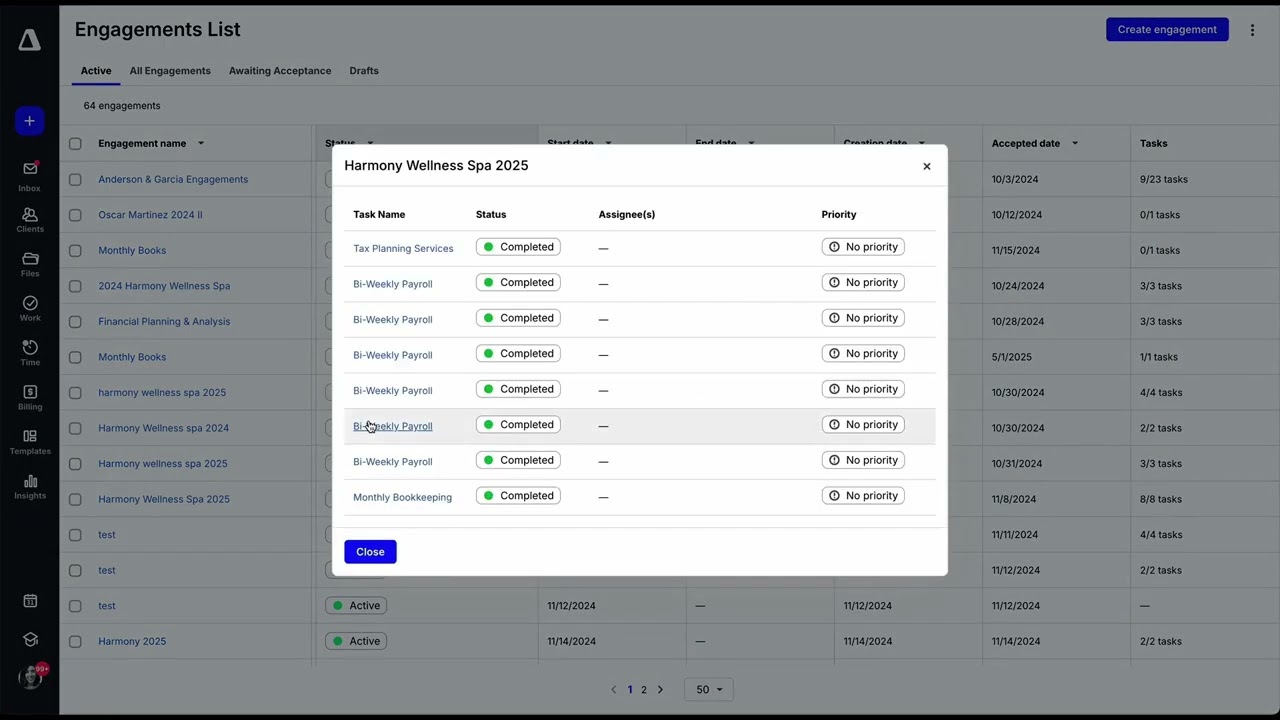
Central client database stores every contact, engagement, related entity, notes and open balance so tax and bookkeeping teams share one source of truth per client.

Secure Client Portal

Each client logs into a branded portal to upload documents, sign engagement letters, message the team securely and pay invoices — no more scattered emails and Dropbox links.

Document Management + OCR

Drag and drop PDFs, W-2s, 1099s and bank statements into Canopy and built-in OCR reads the values, files them in the right folder and tags them to the correct client.

Workflow Automation

Design recurring tax-return, bookkeeping-close and resolution workflows as reusable templates with assignees, deadlines and automatic client reminders.

Engagement Letters & E-Signatures

Send, track and collect e-signatures on engagement letters, 7216 consents and resolution forms — fully compliant and stored in the client record.

Time Tracking & Billing

Staff timers run against client engagements and roll up into invoices, partner-review reports and utilization dashboards without leaving the app.

IRS Transcripts Integration

Pull IRS account, wage and income and record-of-account transcripts for every client in minutes via the official IRS e-Services integration — no more manual faxing.

Tax Notice Management

Track IRS notices and state letters end-to-end: log the notice, assign a responder, draft the response, attach supporting docs and close the loop — all audit-ready.

Pros

  • True all-in-one for tax practices — replaces 3-5 separate tools
  • IRS transcript integration is rare and time-saving for tax resolution
  • Modular pricing lets firms pay only for the modules they use
  • Strong onboarding and customer success team

Cons

  • Modular pricing can become expensive once you add multiple modules
  • Mobile app is more limited than the desktop experience
  • Workflow templates require setup time to customize for each firm
  • Some integrations with niche tax software still missing
Pros: ✔ Purpose-built for tax professionals and CPA firms (not generic PM) ✔ Secure encrypted client portal with e-signatures and document requests ✔ Automated engagement letters, templates and workflows ✔ Built-in time tracking, invoicing and QuickBooks sync ✔ IRS transcripts delivery integration (pulls IRS data automatically) ✔ Bulk tax notice uploading with AI classification ✔ Mobile app for clients and staff ✔ SOC 2 Type II + bank-level encryption Cons: ✘ Steep learning curve during first 2-3 weeks ✘ Pricing becomes expensive as you add modules ✘ Some legacy UI screens still feel dated ✘ No true project billing in lower tiers

See Canopy demos, workflow walkthroughs, and customer practice tours.

Canopy Canopy Tax Practice Management
Canopy Canopy Tax Software Tutorial
Canopy Canopy Client Portal
Canopy Canopy vs Other Tax Tools

Canopy Pricing Plans

Canopy uses per-user, per-month pricing on annual subscriptions, with optional modular add-ons. Pricing scales with firm size and selected capabilities. All plans include baseline Smart Intake, workflows, and client portal access.

  • Starter: $60/user/month (billed annually) — client management, document management, basic workflows, mobile app, free client portal
  • Essentials: $88/user/month (billed annually) — everything in Starter + advanced workflows, automated tasks, time and billing, email integration
  • Modular Pricing (Custom): Around $150 base + add-on modules — firms can build custom plans by selecting Tax Resolution, Document Management Pro, Workflow, Time & Billing, Transcripts & Notices, or Practice Management modules a la carte
  • Enterprise: Custom pricing — dedicated onboarding, SSO, advanced security, custom integrations, dedicated support

A free 15-day trial is available. Canopy also offers a free Client Engagement tier (free client portal & e-signature) for very small firms. Optional add-ons such as additional storage and integrations may increase the per-firm total.

Canopy User Reviews

Verified G2 and Capterra reviews from CPAs, EAs, and bookkeeping firm owners using Canopy.

4.5 EASE OF USE
4.1 VALUE FOR MONEY
3.9 CUSTOMER SUPPORT
4.4 FUNCTIONALITY
Rachel B. CPA, Firm Owner
Mar 2026

Canopy replaced TaxDome, Hubdoc, and Practice Ignition for our 4-person firm. The IRS transcript integration alone saves us 30+ hours each tax season because we used to pull them manually one client at a time. Modular pricing meant we started small and added modules as we grew.

EASE OF USE
VALUE FOR MONEY
CUSTOMER SUPPORT
FUNCTIONALITY

Canopy Alternatives

If Canopy is not the right fit, top alternatives include Karbon (best collaboration and email integration), TaxDome (very competitive pricing with strong portal), Jetpack Workflow (lightweight workflow tracking), Pixie (UK-focused practice management), and Aero Workflow (process-driven for accounting teams).


UniPin Review

UniPin Review

4.3/5 on Trustpilot — Southeast Asia's leading game-credit & digital-voucher reseller for Mobile Legends, PUBG, Free Fire and 1,000+ games
Explore More
Big Cash Review

Big Cash Review

4.7/5 on Google across 400K+ reviews — earn real money & gift cards by playing games and completing simple tasks
Explore More
Verv Review

Verv Review

4.6/5 (App Store & Google Play)
Explore More
Rosetta Stone Review

Rosetta Stone Review

Rated 4.3/5 on Trustpilot — 25M+ learners worldwide since 1992
Explore More
Preply Review

Preply Review

Rated 4.6/5 on Trustpilot — 1.5M+ students, 40,000+ verified tutors
Explore More
Pinwheel Kids and Teens Phone Review

Pinwheel Kids and Teens Phone Review

Rated 4.5/5 on Trustpilot — Trusted by 100,000+ families since 2019
Explore More
National Personal Training Institute Review

National Personal Training Institute Review

Rated 4.6/5 on industry reviews — Accredited diploma program since 1993
Explore More
Koolay Review

Koolay Review

AI-Powered All-in-One CMS for Schools, Nonprofits & Businesses
Explore More
IXL Review

IXL Review

Adaptive K-12 Learning Platform for Math, ELA, Science & More
Explore More
AppSumo Review

AppSumo Review

Rated 4.6/5 on Trustpilot — Lifetime software deals, SaaS bundles and AI tools at heavily discounted prices
Explore More
Guesty Review

Guesty Review

Guesty Review – Property Management Software for Airbnb, Vrbo & Direct-Booking Short-Term Rentals
Explore More
Piano Marvel Review

Piano Marvel Review

Piano Marvel Review – Structured Online Piano Lessons, Sight-Reading Tests & 5,000+ Pieces
Explore More
ScrapingBee Review

ScrapingBee Review

4.7+/5 across G2 & Capterra — JavaScript-rendered web scraping API trusted by 10,000+ devs
Explore More
Classin Review

Classin Review

4.6+/5 across G2 & Capterra — purpose-built virtual classroom for 60K+ institutions in 150 countries
Explore More
Harpoon Review

Harpoon Review

4.6+/5 across G2 & Capterra — forward-looking time-tracking + invoicing for freelancers
Explore More
Elevo Learning Review

Elevo Learning Review

96% of 550+ surveyed principals would rebook Elevo — WASC-accredited K-8 SEL programs
Explore More
Sploot Review

Sploot Review

4.8 on Birdeye (1500+ reviews) & 4.6 on App Store
Explore More
Make.com Review

Make.com Review

4.8 (300+ reviews) on G2 & 4.7 on Capterra
Explore More
JustCall Review

JustCall Review

4.3 (2,376 reviews) on G2 & 4.1 on Capterra
Explore More
LinkBox Review

LinkBox Review

4.5 (50+ reviews) on Capterra & SoftwareAdvice
Explore More
Wyzant Review

Wyzant Review

3.9 (1,500+ reviews) on Sitejabber & 4.7 on EduReviewer
Explore More
Firstbase Review

Firstbase Review

Firstbase
Explore More
Finviz Review

Finviz Review

4.6/5
Explore More
FCP Effects Review

FCP Effects Review

FCP Effects
Explore More
FastComet Review

FastComet Review

FastComet Review
Explore More
ezTexting Review

ezTexting Review

EZ Texting Review
Explore More
Entrupy Review

Entrupy Review

Entrupy Review
Explore More
Ablefy Review

Ablefy Review

4.4/5 on Capterra, 120+ verified reviews
Explore More
Edureka Review

Edureka Review

4.5/5 on Trustpilot, 15,000+ learner reviews
Explore More
eDesk Review

eDesk Review

4.4/5 on G2, 400+ verified reviews
Explore More
Durable Review

Durable Review

Durable Review
Explore More
DeskTime Review

DeskTime Review

4.5/5 on G2 (391 verified reviews)
Explore More
EmailOctopus Review

EmailOctopus Review

4.7/5 on G2 (390 verified reviews)
Explore More
Demio Review

Demio Review

4.7/5 on G2 (265 verified reviews)
Explore More
Databox Review

Databox Review

4.4/5 on G2 (390 verified reviews)
Explore More
Creately Review

Creately Review

4.4/5 on G2 (1,200 verified reviews)
Explore More
Concord Review

Concord Review

4.4/5 on G2 (310 verified reviews)
Explore More
Clipping Magic Review

Clipping Magic Review

4.5/5 on G2 (240 verified reviews)
Explore More
ClickSend Review

ClickSend Review

4.6/5 on G2 (380 verified reviews)
Explore More
Caspio Review

Caspio Review

4.4/5 on G2 (195 verified reviews)
Explore More
Capsule CRM Review

Capsule CRM Review

4.6/5 on G2 (630 verified reviews)
Explore More
Browse AI Review

Browse AI Review

4.8/5 on G2 (530 verified reviews)
Explore More
Botsify Review

Botsify Review

4.5/5 on G2 (165 verified reviews)
Explore More
Blueshift Review

Blueshift Review

4.4/5 on G2 (380 verified reviews)
Explore More
Blogify Review

Blogify Review

4.4/5 on G2 (95 verified reviews)
Explore More
Ausha Review

Ausha Review

4.6/5 on G2 (180 verified reviews)
Explore More
Arise Apparel Review

Arise Apparel Review

4.6/5 on Trustpilot (220 verified reviews)
Explore More
Any.do Review

Any.do Review

4.6/5 on G2 (720 verified reviews)
Explore More
Anchor Review

Anchor Review

4.4/5 on G2 (650 verified reviews)
Explore More
AmEnglish Review

AmEnglish Review

Editorial rating: 4.0 / 5
Explore More
Alison Review

Alison Review

4.5/5 on Trustpilot (5,800+ verified reviews)
Explore More
Adalo Review

Adalo Review

4.3/5 on G2 (6 verified reviews)
Explore More
Cake.com Review

Cake.com Review

4.2 (2,501)
Top Rated Features
  1. All-in-one solution
  2. Easy integration
  3. Team collaboration
Explore More
OpenPhone Review

OpenPhone Review

4 (2,100)
Top Rated Features
  1. Team Collaboration
  2. Voicemail Management
  3. Security & Compliance
Explore More
Looka Review

Looka Review

4.3 (2,300)
Top Rated Features
  1. Advanced Keyword and Niche Research
  2. Cover Designer with Trim Size Accuracy
  3. PuzzleWiz Generator (Pro Plan Only)
Explore More
Later Review

Later Review

4.2 (2,050)
Top Rated Features
  1. Multi Platform Scheduling
  2. Media Library Management
  3. Analytics and Reporting
Explore More
Housecall Pro Review

Housecall Pro Review

4.5
Top Rated Features
  1. Job scheduling automation
  2. Payment collection
  3. Reporting tools
Explore More
1password Review

1password Review

4.8 (2,389)
Top Rated Features
  1. Stay Organized Easily
  2. Multi-Device Syncing
  3. Strong Online Security
Explore More
FAQs

Canopy FAQs

Common questions about Canopy pricing, modules, and tax practice features.

Canopy uses modular pricing. Client Management is around $40/user/month; additional modules (Document Management, Workflow, Time & Billing, Tax Resolution) add $20-50/user each. Bundles offer discounts.

Yes — Canopy offers a free trial of the core Client Management module so you can evaluate before committing.

Yes. Solo practitioners use the Client Management module + Document + eSignature for a tightly priced setup; modular structure scales as the firm grows.

Yes. The Tax Resolution module integrates with IRS Transcript Delivery System to pull client transcripts in bulk via CAF authorization.

Yes. Canopy includes eSignature with knowledge-based authentication (KBA) that meets IRS requirements for Form 8879 and similar.

TaxDome is generally cheaper at the entry level; Canopy offers stronger workflow automation, native IRS transcript integration, and a more modern interface — choice depends on practice size and feature needs.

Yes. Stripe-integrated payments accept ACH and credit cards directly through invoices and the client portal.

Canopy is headquartered in Draper, Utah, and was founded in 2014 by Kurt Avarell.

Yes. Canopy has direct QuickBooks Online integration for syncing client data and invoices, and works alongside QuickBooks Desktop.

Yes. Canopy is fully cloud-based with web access, native mobile apps, and SOC 2 Type II security certification.

⚠️ Affiliate Disclosure: This site contains affiliate links. We may earn a commission when you purchase through our links at no extra cost to you. Results are not typical.