⚠️ Affiliate Disclosure: This page contains affiliate links. We may earn a commission at no extra cost to you. This does not influence our reviews. Read full disclosure →

GMass Review

icon01

GMass Review

Best Cold Email & Mail Merge Tool for Gmail

GMass Overview

GMass is a Gmail-based mail merge and cold email tool that runs entirely inside your existing Gmail or Google Workspace account. Instead of moving you to a separate sending platform, GMass adds powerful campaign features — personalisation tokens, automatic follow-ups, scheduling, list building from search, and reporting — directly into the Gmail Compose window via a Chrome extension.

This Gmail-native approach is why GMass has become a favourite among solopreneurs, recruiters, salespeople, and agencies running outbound campaigns. You get the deliverability of your own Google account, native reply handling in your inbox, and a familiar interface — without learning a separate SaaS app.

Mail Merge Inside Gmail

Personalise hundreds or thousands of emails with merge tags pulled from a Google Sheet — first name, company, role, custom fields — without leaving the Gmail Compose window.

Automatic Follow-Up Sequences

Set up to eight conditional follow-ups based on no-reply, no-open, or no-click triggers. Sequences pause automatically when a prospect replies.

Google Sheets Integration

Connect any Google Sheet as your mailing list. Updates to the sheet are reflected on the next send — perfect for dynamic CRM exports.

Gmail Search List Builder

Build a campaign list straight from a Gmail search query — e.g. send to every person who has emailed you in the last 90 days that contains a specific keyword.

Behaviour-Based Campaigns

Trigger a new campaign automatically when a recipient opens, clicks, or replies — turning Gmail into a lightweight outbound marketing engine.

Reply Detection & Auto-Pause

GMass detects human replies and automatically removes recipients from follow-up sequences so you do not annoy interested prospects.

Deliverability & Inbox Placement

Built-in deliverability suite includes a free inbox placement test, spam score checker, and email warming via GMass Reverse to keep cold campaigns landing in primary inboxes.

Detailed Campaign Analytics

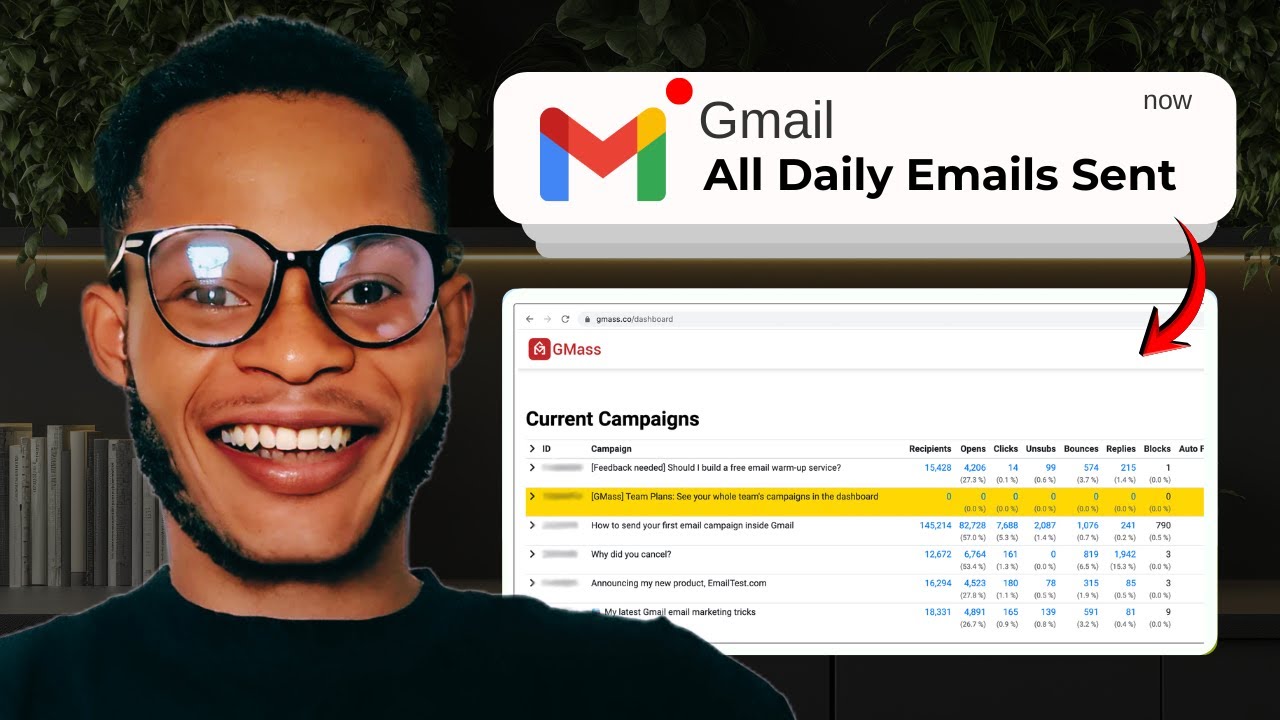
Track opens, clicks, replies, bounces, and unsubscribes per campaign or per recipient, with a unified dashboard inside Gmail and exportable reports.

GMass Features – What You Get?

GMass packs a full cold-email and mail-merge stack into a Chrome extension that lives inside Gmail. Beyond basic personalisation, you get automatic follow-ups, Google Sheets connectors, behaviour-based campaigns, list building from Gmail search, deliverability tools, A/B testing, and detailed open/click/reply analytics. Paid tiers add advanced reporting, team accounts, and SMTP options for high-volume senders.

Mail merge in Gmail, automatic follow-ups, Google Sheets sync, list builder, personalisation, scheduling, A/B testing, open/click tracking, reply detection, deliverability tools.

Video Guides and Tutorials

Hand-picked walkthroughs from independent reviewers and the official GMass channel covering setup, campaigns, follow-ups, and Gmail-based deliverability.

GMass — Gmass Yt Aabobs1ysl0
GMass — Gmass Yt Umv9kuxkm8o
GMass — Gmass Yt Rtdmgyxc1ca
GMass — Gmass Yt W5amufvhebc

GMass Price Plans

GMass offers a free tier plus paid plans for individuals and team pricing, all run inside Gmail. Because GMass updates its plan pricing periodically, please check the official gmass.co/pricing page for the current monthly and annual rates in your region.

Free

Up to 50 emails per day, basic mail merge, and limited tracking — enough to evaluate the workflow inside Gmail.

Standard

Unlimited sends (subject to Gmail’s own daily limits), basic auto follow-ups, basic reports, and Gmail support. Best for individual users testing outbound.

Premium

Adds advanced behaviour-based campaigns, sequence pausing, reply detection, and detailed analytics. Recommended tier for active cold-email senders and recruiters.

Professional

Adds priority support, custom tracking domains, A/B testing, premium deliverability tools, and unlimited sequences — built for high-volume professional senders.

Team Plans

Custom pricing — contact sales. Volume discounts, shared templates, central billing, and team-level reporting for agencies and sales teams.

Pros and Cons of GMass

Pros

  • ✅ Lives inside Gmail — no need to learn a new platform.
  • ✅ Uses your own Gmail/Workspace account for sending, giving strong native deliverability.
  • ✅ Powerful Google Sheets integration for dynamic lists.
  • ✅ Automatic follow-ups with smart pause-on-reply behaviour.
  • ✅ Free tier and a 14-day full-feature trial make it easy to test.
  • ✅ Built-in inbox placement test and deliverability tooling.

Cons

  • ❌ Daily send limits are still bound by Gmail/Google Workspace caps.
  • ❌ Reporting UI is functional but less polished than dedicated SaaS competitors.
  • ❌ No native CRM — you need a separate tool for full pipeline tracking.
  • ❌ Advanced personalisation can require some spreadsheet skill to set up.

What real users say

On G2, GMass holds a 4.7/5 average across 800+ reviews, with users repeatedly praising the simplicity of running mail merges directly inside Gmail (source: G2.com/products/gmass). Capterra reviewers (4.8/5 average, 1,000+ reviews) highlight the speed of campaign setup and the responsive support team. The most common critique across review sites is that the analytics dashboard, while functional, feels dated compared to dedicated outbound platforms.
Overall – 4.7/5
G2 – 4.7/5
Capterra – 4.8/5
Trustpilot – 4.4/5
Andrew P. Sales Development Lead • Mid-Market • Reviewed on G2
2025-08-21

I was already living in Gmail every day, so moving outbound into a separate tool felt like overkill. GMass lets me run 200–300-email campaigns straight from Compose, with proper follow-ups and reply detection. Setup took an afternoon and we never went back to our previous outreach platform.

Ease of Use
Features
Value for Money
Customer Support
Sara H. Independent Recruiter • Reviewed on Capterra
2025-09-30

For candidate outreach the Google Sheets integration is the killer feature. I keep my pipeline in a Sheet, GMass pulls names, roles, and personalised intros automatically, and replies land in the same inbox I already use. Premium plan paid for itself in the first week.

Ease of Use
Features
Value for Money
Customer Support
Marcus L. Agency Owner • Reviewed on Trustpilot
2025-10-25

Strong tool with one of the best free tiers around. The analytics dashboard is a bit utilitarian — I would love charts that go deeper — but deliverability has been excellent on our cold campaigns, and the inbox placement test is a really nice touch.

Ease of Use
Features
Value for Money
Customer Support

Top GMass Alternatives

If GMass isn’t quite the right fit, these alternatives are worth comparing depending on your sending volume and team setup:


  • Mailshake — dedicated outbound platform with a polished UI and strong sales-team workflows; better for managed pipelines but more expensive.
  • Lemlist — known for image and video personalisation; popular with agencies and SDR teams that need creative cold emails.
  • Mailmeteor — lightweight Gmail mail merge competitor with simpler features and a friendlier free tier; weaker on follow-up logic.
  • Saleshandy — outbound email platform with built-in lead discovery and unified inbox; a good fit when you want sequences plus prospecting in one tool.
  • YAMM (Yet Another Mail Merge) — minimalist Google Workspace add-on for one-off mail merges; cheaper but lacks follow-ups and analytics depth.
Omnisend Review

Omnisend Review

Rated 4.6/5 on G2 — Powers 130,000+ ecommerce stores worldwide
Explore More
Bouncer Review

Bouncer Review

4.8/5 on G2 & 4.9/5 on Capterra — pay-as-you-go email verification
Explore More
SendPulse Review

SendPulse Review

4.6 (700+ reviews) on G2 & 4.6 (700+ reviews) on Capterra — multi-channel marketing all-in-one
Explore More
MailerSend Review

MailerSend Review

4.6 (350+ reviews) on G2
Explore More
Tailor Brands Review

Tailor Brands Review

4.4 (2,800+ reviews) on Trustpilot
Explore More
RoboForm Review

RoboForm Review

4.7 (2,300+ reviews) on Trustpilot
Explore More
Start Infinity Review

Start Infinity Review

4.7 (180+ reviews) on Capterra
Explore More
Radical Storage Review

Radical Storage Review

4.8 (50,000+ reviews) on Trustpilot
Explore More
Wishup Review

Wishup Review

4.8 (380+ reviews) on Trustpilot
Explore More
Manatal Review

Manatal Review

4.8 (130+ reviews) on G2
Explore More
Adsterra Review

Adsterra Review

4.6 (1,800+ reviews) on Trustpilot
Explore More
GoodSync Review

GoodSync Review

4.5 (700+ reviews) on TrustRadius
Explore More
EKM Review

EKM Review

4.5 (1,300+ reviews) on Trustpilot
Explore More
SimplyBook.me Review

SimplyBook.me Review

4.6 (1,200+ reviews) on Capterra
Explore More
Squid Proxies Review

Squid Proxies Review

4.5 (200+ reviews) on Trustpilot
Explore More
Vonage Review

Vonage Review

4.3 (1,200+ reviews) on G2
Explore More
GeneratePress Review

GeneratePress Review

4.9 (1,400+ reviews) on WordPress.org
Explore More
Astra Review

Astra Review

4.7 (5,800+ reviews) on WordPress.org
Explore More
Proton Mail Review

Proton Mail Review

4.6 (8,000+ reviews) on Trustpilot
Explore More
BuiltWith Review

BuiltWith Review

4.5 (300+ reviews) on Capterra
Explore More
HostPapa Review

HostPapa Review

4.4 (1,500+ reviews) on Trustpilot
Explore More
Logo AI Review

Logo AI Review

4.5 (250+ reviews) on Trustpilot
Explore More
Lemlist Review

Lemlist Review

4.4 (340+ reviews) on G2
Explore More
SimpleTexting Review

SimpleTexting Review

4.7 (740+ reviews) on G2
Explore More
Benchmark Email Review

Benchmark Email Review

4.4 (1,200+ reviews) on G2
Explore More
Postmark Review

Postmark Review

4.6 (300+ reviews) on G2 & 4.8 on Capterra
Explore More
MailerCheck Review

MailerCheck Review

4.9 (2,423)
Top Rated Features
  1. Easy Email Verification
  2. Advanced Validation Features
  3. Real-Time Reporting
Explore More
GetResponse Review :

GetResponse Review :

4 (2,302)
Top Rated Features
  1. Easy Automation
  2. Professional Templates
  3. Advanced Analytics
Explore More
SMTP Review

SMTP Review

3.3 (2,911)
Top Rated Features
  1. Reliable Email Delivery
  2. Integration with Applications
  3. Authentication Support
Explore More
Fastmail Review

Fastmail Review

4 (2,111)
Top Rated Features
  1. Secure Communication
  2. Contacts Management
  3. Multiple Devices


Explore More
ZeroBounce Review

ZeroBounce Review

4.8 (2,678)
Top Rated Features
  1. Accurate Email Validation
  2. Spam Trap Detection
  3. AI-Powered Scoring
Explore More
SendX Review

SendX Review

4.4 (2,111)
Top Rated Features
  1. Drag-and-drop Email Builder
  2. Automated Workflows
  3. Guaranteed deliverability
Explore More
Woodpecker Review

Woodpecker Review

4.5 (2,246)
Top Rated Features
  1. Smart Email Automation
  2. Deliverability Optimization
  3. CRM Integrations
Explore More
NullBox Review

NullBox Review

4.6 (2,244)
Top Rated Features
  1. Data Tracking Simplified
  2. Seamless Collaboration
  3. Automated Reports
Explore More
Pabbly Review

Pabbly Review

4.8 (2,164)
Top Rated Features
  1. Automation Simplified
  2. Billing and Payments
  3. Lead Management
Explore More
MailTag Review

MailTag Review

4.4 (2,714)
Top Rated Features
  1. Real-Time Tracking
  2. Scheduling Emails
  3. Email Automation
Explore More
FAQs

GMass Frequently Asked Questions

Common questions before signing up for GMass.

Yes. GMass installs as a Chrome extension and adds buttons inside Gmail Compose. All sending happens from your Gmail/Workspace account, so replies land in your normal inbox.

Yes — the Free plan allows up to 50 emails per day with most core features. Paid plans start at $25/month for unlimited sends and follow-up automation.

GMass uses your own Gmail/Workspace account, so deliverability mirrors what you would get from sending manually. The Professional plan adds custom tracking domains and inbox placement testing to further protect deliverability.

GMass itself does not limit sends, but Google does — typically 500/day for free Gmail and 2,000/day for Google Workspace accounts. GMass will batch and schedule sends to respect those limits.

Yes. The Standard plan supports basic follow-ups; Premium and Professional add behaviour-based triggers (no open, no click, no reply) and automatic pausing when a recipient replies.

GMass is cheaper, simpler, and fully Gmail-native — best for solo senders, recruiters, and small teams. Mailshake and Lemlist are dedicated outbound platforms with richer team and CRM features, but at a higher price and learning curve.

⚠️ Affiliate Disclosure: This site contains affiliate links. We may earn a commission when you purchase through our links at no extra cost to you. Results are not typical.