vidIQ is the most widely used YouTube growth and optimization platform on the market, with more than 2.8 million creators using it to research keywords, analyze competitors, optimize titles and thumbnails, and accelerate channel growth. Officially certified by YouTube as a trusted partner, vidIQ combines a deep set of analytics with AI-powered tools — title and description writers, thumbnail testing, AI Coach, and a Shorts Scorecard — that help creators publish content that actually performs.
Available as a free Chrome and Edge extension and as upgraded paid plans (Boost, Boost+, Coaching), vidIQ overlays its data and recommendations directly inside YouTube, so creators do not need to switch tabs to do their research. Mid-2025 brought a major AI release with the expanded AI Coach, automated Thumbnail v2 testing, an AI Script Writer, and deeper analytics — making 2026 vidIQ arguably the most complete YouTube workflow tool available.
Find YouTube-specific keywords with real search volume, competition scores, and related queries — vidIQ pulls actual YouTube search data, not Google.
Add up to 100 competing channels (depending on plan) and get notified when they upload, see their best-performing videos, and reverse-engineer what is working in your niche.
Personalised AI coach that analyses your channel and gives growth advice, plus an AI script writer that drafts hook-driven video scripts in your tone of voice.
Upload three thumbnails and let vidIQ rotate them to find the best click-through rate — a feature normally limited to YouTube Studio for a small number of channels.
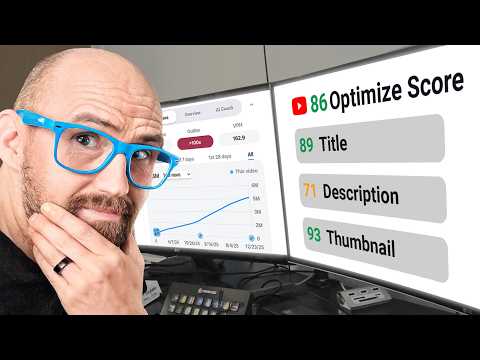
Real-time score for every video upload showing how well your title, description, and tags align with high-performing patterns in your niche.
Daily AI-generated video idea suggestions based on your channel niche, plus push alerts when a topic in your niche is trending.
Specifically built for YouTube Shorts — analyses your hook, retention, packaging, and pacing to help short-form content go viral.
Most of vidIQ’s power is delivered through its Chrome and Edge extension, which overlays insights directly on YouTube pages without slowing the site down.
vidIQ wraps a complete YouTube growth workflow into one extension and dashboard: keyword research, competitor monitoring, channel audits, AI-assisted title and description writing, AI Coach, AI Script Writer, automated thumbnail testing, daily video idea generation, real-time view-velocity alerts, Shorts Scorecard, and detailed channel analytics. Higher tiers add personal coaching with YouTube experts, channel audits, and tailored growth roadmaps. Everything is delivered through both a clean web dashboard and a deeply integrated browser extension that overlays insights directly on YouTube pages.
To help you decide whether vidIQ is the right YouTube growth tool for you, we have curated four hand-picked YouTube videos covering honest reviews, full beginner tutorials, and channel-growth case studies. These videos walk you through installing the extension, doing keyword research, optimizing existing videos, and using the AI Coach to plan future content.
vidIQ offers a generous free tier plus three paid plans. Pro is $7.50/month (or $5/month annual) with full keyword research and 5 competitor channels. Boost is $39/month adding 10 competitors and historical data. Max is $79/month (or $39/month annual) with AI Coach and promotional tools. There’s also a 1-on-1 coaching option for serious creators and enterprise plans for agencies.
vidIQ has restructured its plans for 2026 around four main tiers — Free, Boost, Boost+, and Coaching. Most working creators land on Boost; serious channels and small media teams move to Boost+ or Coaching. Below are the current public prices, with the annual options offering substantial discounts.
Limited keyword suggestions, basic daily YouTube video ideas, core channel stats, the browser extension overlay, and access to community channel scoring. Best for trying vidIQ before upgrading.
Unlimited ideation, full keyword and competitor research, video optimization scorecards, AI title and description writers, AI Coach, Thumbnail v2 testing, and the most-used tools for solo creators.
Everything in Boost plus deeper competitor tracking (more channels, more videos), advanced analytics, expanded AI usage limits, and the AI Script Writer for full-length content.
Everything in Boost+ plus monthly 1-on-1 coaching with a vidIQ YouTube expert, full channel audit, tailored growth roadmap, and direct support to scale your channel.
vidIQ holds a 4.5/5 average across G2 reviews, a 4.6/5 on Capterra, and 4.3/5 on Trustpilot from over 1,200 reviews. Power users praise the keyword and competitor research, the SEO scorecards, and the AI Coach. Critical reviews most often cite the cost of Boost+ and Coaching for smaller channels and occasional generic AI output.

If vidIQ does not fit your workflow — perhaps you want a leaner extension, a free-forever option, or features built specifically for short-form — these are the strongest 2026 alternatives:


















Quick answers to the most common questions creators ask before subscribing to vidIQ in 2026.
⚠️ Affiliate Disclosure: This site contains affiliate links. We may earn a commission when you purchase through our links at no extra cost to you. Results are not typical.