SuperSaaS is a flexible online booking and scheduling system for service businesses — yoga studios, clinics, tutors, equipment rentals, classes, group sessions. In this SuperSaaS review by IdealOnlineBusiness.com, we examine its 22 customizable schedule types, multi-language support, payment integrations, and pricing model that scales only with usage.
The platform supports PCI-compliant payments via Stripe and PayPal, embeddable booking widgets, and a generous free tier for businesses with under 50 future appointments. Capterra reviewers are consistently positive about SuperSaaS, calling out the flexible scheduling logic and the pay-only-for-usage model as the standout reasons to choose it over Acuity, Calendly, or Setmore.
Most flexible scheduling logic in the SMB space with 22 different schedule types for any service business.
Generous free tier supports up to 50 future appointments at any time, no card required to start.
Booking interface available in 30+ languages so you can serve clients in their native language.
PCI-compliant payment processing through Stripe, PayPal, and Mollie integrations.
Embed booking on any website via iframe or JavaScript widget with one line of code.
Capacity-based scheduling for group classes, fitness sessions, and equipment rentals with attendee limits.
Schedule rooms, equipment, fleet vehicles, and other resources alongside staff appointments.
Set up recurring weekly or monthly appointments for clients with automatic rebooking.
SuperSaaS packages flexible online appointment scheduling with 29+ languages and currencies, multi-resource availability checking, online payments (PayPal, Stripe), SMS notifications, and 1,000+ integrations into one affordable booking platform for solos, agencies, and enterprises.
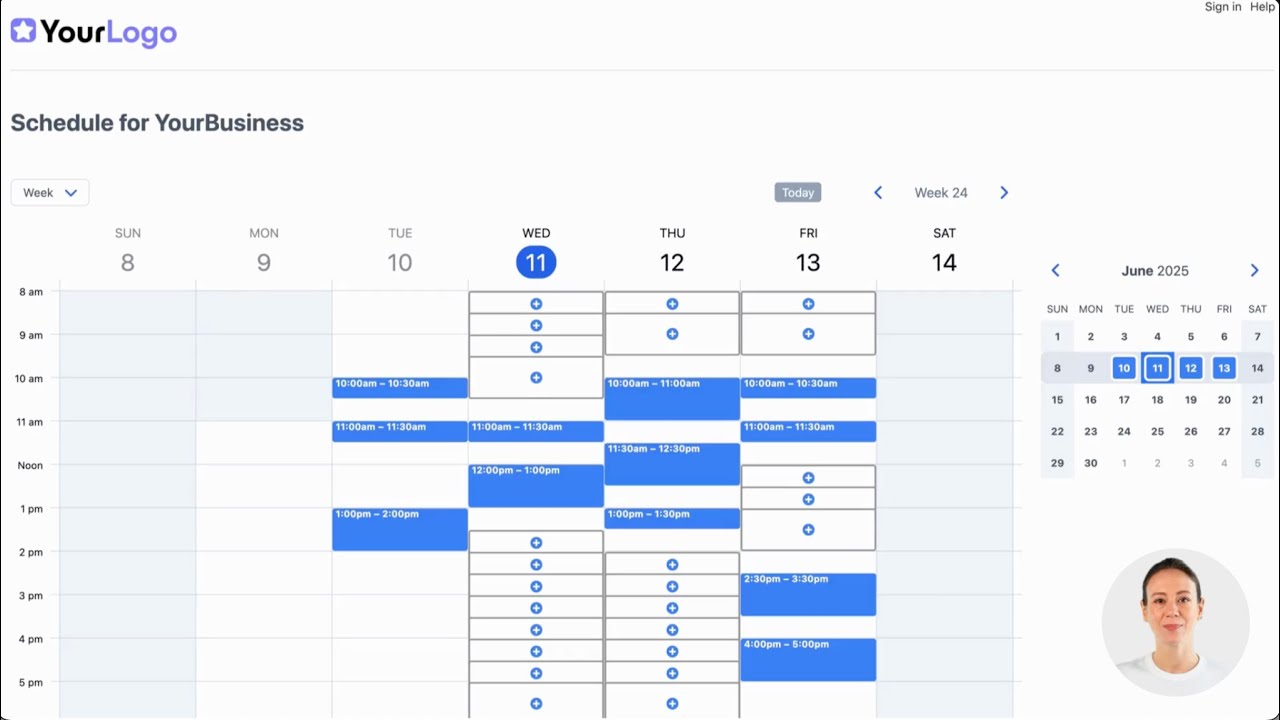
Watch real SuperSaaS walkthroughs covering appointment scheduling setup, automated service booking demos, class and event booking systems, and the full schedule-types overview.
SuperSaaS Price Plans
Free Plan — $0/month: Up to 50 future appointments, 500 user records, basic features. Ideal for solos and small clinics testing online booking.
Plan A — $9/month: Up to 100 future appointments, online payments, SMS notifications, custom forms.
Plan B — $18/month: Up to 300 future appointments, multiple schedules, full feature set.
Plan C — $27/month: Up to 600 future appointments. Larger clinics, studios, and growing service businesses.
Plan D — $36/month and higher: 1,000+ future appointments. Custom enterprise volumes available.
All paid plans include a free trial. SuperSaaS supports 29+ languages and multiple currencies.
Here’s a quick summary of what users consistently praise and criticize across G2, Capterra, and GetApp reviews of SuperSaaS.
What real users say
SuperSaaS holds positive ratings on Capterra (4.6/5 across 300+ reviews) and GetApp. Reviewers most often highlight customer support quality, multi-resource scheduling, and the affordable pricing tiers. The most common critique is the dated UI compared to newer schedulers. Sources: Capterra (capterra.com/p/87751/SuperSaaS-Appointment-Schedule/reviews) and GetApp.
SuperSaaS Price Plans
Free Plan — $0/month: Up to 50 future appointments, 500 user records, basic features.
Plan A — $9/month: 100 future appointments, online payments, SMS notifications, custom forms.
Plan B — $18/month: 300 appointments, multiple schedules, full feature set.
Plan C — $27/month: 600 appointments. Larger clinics, studios.
Plan D — $36/month and higher: 1,000+ appointments. Custom enterprise volumes.
29+ languages, multiple currencies, free trial.
Here’s a quick summary of what users praise and criticize across G2, Capterra, and GetApp reviews of SuperSaaS.
What real users say
SuperSaaS holds 4.6/5 across 300+ reviews on Capterra and positive ratings on GetApp. Sources: Capterra and GetApp.

SuperSaaS is the most flexible booking system for SMBs, but several alternatives serve different niches. Calendly dominates 1-on-1 appointment scheduling with stronger UX. Acuity Scheduling targets premium service businesses with deeper customization. Setmore offers a free unlimited tier for solo operators. Square Appointments bundles booking with point-of-sale for retail. Mindbody dominates fitness and wellness studios. Choose SuperSaaS specifically when you need flexible group, capacity, and resource scheduling at a usage-based price.


Here are answers to the most common questions about SuperSaaS to help you decide if it is the right scheduling platform for your service business.
⚠️ Affiliate Disclosure: This site contains affiliate links. We may earn a commission when you purchase through our links at no extra cost to you. Results are not typical.