⚠️ Affiliate Disclosure: This page contains affiliate links. We may earn a commission at no extra cost to you. This does not influence our reviews. Read full disclosure →

Glide Review

icon01

Glide Review

Rated 4.7/5 on G2 — No-code app builder — turn Google Sheets and data into mobile and web apps in minutes

Glide Overview

Glide is a no-code platform that turns spreadsheets into fully functional business apps for both web and mobile. Founded in 2018 and based in San Francisco, Glide has become one of the most loved no-code tools on G2 and Capterra, used by hundreds of thousands of small businesses, schools, internal-tools teams, and operations leaders. Connect a Google Sheet, Excel file, Airtable base, or Glide Tables, and the platform generates an interface you can customize with components, workflows, and role-based permissions — typically in minutes rather than months.

2025 brought a major AI release: an all-in-one AI app builder, scheduled workflows, an expanded library of integrations, and Glide AI for generating actions, formulas, and automations from natural language prompts. Pricing tiers start with a generous free plan and run from $19 (Explorer) up to $199 (Business) per month, with custom Enterprise pricing for larger deployments. Glide is best for non-developers who need internal tools, customer-facing apps, or operational dashboards without hiring a developer.

Spreadsheet to App in Minutes

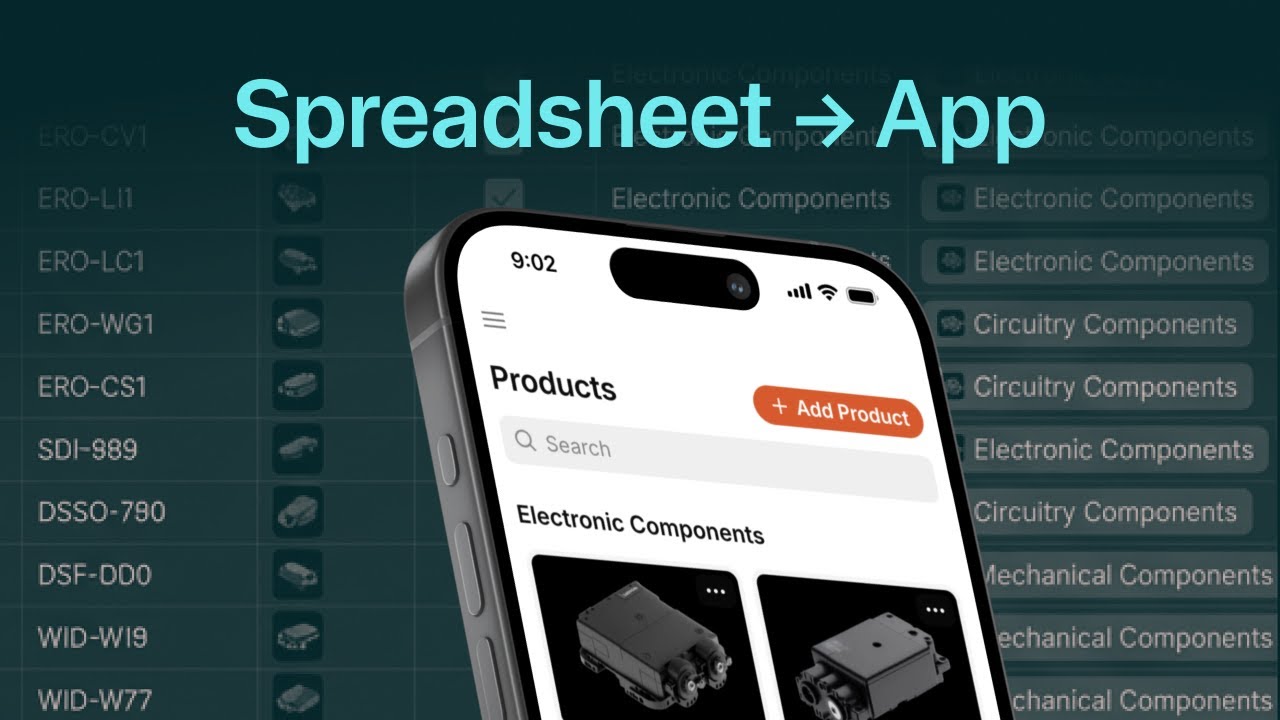
Connect a Google Sheet, Excel file, Airtable, or Glide Table — Glide reads your data and generates a working app interface immediately, ready to customize.

AI App Builder & Glide AI

Describe the app you want in plain English and Glide AI scaffolds the screens, actions, and data structure for you. Glide AI also generates formulas, automations, and workflow logic on demand.

Custom Workflows & Automation

Build no-code workflows for approvals, notifications, scheduling, and reporting — including new scheduled triggers (daily, weekly, monthly) added in 2025.

Role-Based Access & Permissions

Fine-grained user roles tied to columns and screens — perfect for finance, HR, ops, and other teams that need to control who sees what.

Beautiful Mobile & Web Apps

Apps look polished out of the box with native-feeling layouts on iOS, Android, and the web. Add your own logo, colors, and branding in minutes.

Connects to Your Existing Stack

Native integrations with Google Sheets, Excel, Airtable, SQL databases, Stripe, Zapier, Make, and dozens of CRMs and ERPs — no developer required.

Used by 100,000+ Businesses

Glide powers internal tools, CRM apps, inventory trackers, and customer-facing apps for everything from local schools to Fortune 500 ops teams.

Strong Community & Templates

Hundreds of ready-to-use templates plus an active community where you can hire experts, copy app ideas, and learn best practices fast.

Glide Features — What You Get?

Glide gives you a complete no-code app stack: data sources (Glide Tables, Google Sheets, Excel, Airtable, SQL), drag-and-drop screens, components for forms, lists, calendars, maps, charts, and rich media, no-code workflows with scheduled triggers, role-based permissions, computed columns, native AI features (Glide AI for actions and formulas), the AI App Builder for generating apps from a prompt, an integrations marketplace (Stripe, Twilio, Zapier, Make, Slack, Google Workspace, and more), and one-click publishing to web and mobile. Higher tiers unlock larger row limits, the Glide API, work-email sign-ins, advanced security controls, and unlimited public/personal users.

Video Guides and Tutorials

To help you decide whether Glide is the right no-code platform for your business, we have curated four hand-picked YouTube videos covering beginner tutorials, no-code reviews, and Google Sheets-to-app walkthroughs. These videos walk you through your first build, customising the interface, connecting your spreadsheet, and publishing your app to a web URL or app icon.

Glide — Gl V1
Glide — Gl V2
Glide — Gl V3
Glide — Gl V4

Top Glide Services

Glide offers five tiers: Free, Explorer, Maker, Business, and Enterprise. Free gives essentials for personal apps. Explorer is $19/month annual. Maker is $49-60/month for 3 apps with unlimited personal users. Business is $249/month for unlimited apps with 20 users (+$10/user/month extra). Enterprise pricing is custom. Annual billing offers significant savings over monthly rates.

Glide Price Plans

Glide offers a generous free tier plus four paid plans (Explorer, Maker, Business, Enterprise). All paid plans are available month-to-month or annually with a meaningful annual discount. Below are the current public prices as of 2026.

Free Plan — $0

One published app for up to 10 personal users, 25,000 rows, Glide Tables data source, community support. Great for trying Glide before upgrading.

Explorer — $19/month

Unlimited apps, workflows, Glide AI, more integrations, and increased row limits. Best for solo makers and individual app builders.

Maker — $49/month

Designed for MVPs, prototyping, communities, and schools. Includes unlimited personal users, larger row limits, and additional Glide AI capacity.

Business — $199/month

Adds Airtable, Excel, Glide API, work-email sign-in, and stronger security controls. Includes 30 users; additional users $5/month each. Best for SMBs and operations teams.

Enterprise — Custom pricing

SSO, audit logs, dedicated support, custom data residency, contractual SLAs, and bespoke implementation help. Quote on request from Glide sales.

Pros and Cons of Glide

Pros

  • ✅ Easiest no-code platform to learn — non-developers can ship in days
  • ✅ Best-in-class spreadsheet-to-app conversion
  • ✅ Beautiful, native-feeling apps for web, iOS, and Android
  • ✅ Glide AI generates apps, formulas, and workflows from prompts
  • ✅ Strong integrations with Sheets, Excel, Airtable, SQL, Stripe, Zapier, Make
  • ✅ Generous free tier with 25,000 rows
  • ✅ Active community and hundreds of templates
  • ✅ Excellent G2 and Capterra ratings

Cons

  • ❌ Jump from Maker ($49) to Business ($199) is steep
  • ❌ Per-user pricing on Business adds up for larger teams
  • ❌ Limited free tier user count for production apps
  • ❌ Some enterprise features locked behind Business or higher
  • ❌ Complex apps still benefit from a developer for edge cases

What real users say

Glide rates around 4.7/5 on G2 and 4.7/5 on Capterra, with users praising the speed of building real working apps and the quality of customer support. The most common criticism across both platforms is the price jump from Maker to Business and per-user costs at scale. For internal tools and customer-facing apps that would otherwise need a developer, Glide is consistently rated as one of the highest-ROI no-code platforms in 2026.

4.7 EASE OF USE
4.4 VALUE FOR MONEY
4.6 CUSTOMER SUPPORT
4.6 FUNCTIONALITY
Andrew K. Verified User on G2
October 09, 2025

Glide is the closest thing I have found to magic in software. We replaced an aging FileMaker system that powered our field operations with a Glide app in two weeks, and the team adoption was instant because the UI just looks like a normal mobile app. The Maker plan covers everything we need at a fraction of what custom development would have cost.

Source: paraphrased from public G2 review — https://www.g2.com/products/glide-2023-07-10/reviews

EASE OF USE
VALUE FOR MONEY
CUSTOMER SUPPORT
FUNCTIONALITY
Sofia M. Verified User on Capterra
September 19, 2025

Glide has been excellent for our small school’s parent app and our internal staff scheduling. The interface is genuinely beautiful and Glide AI cut my build time in half. My only concern is the leap from the $49 Maker plan to $199 Business — we will likely need that step up next year for the integrations and it is a noticeable jump.

Source: paraphrased from public Capterra review — https://www.capterra.com/p/216009/Glide/

EASE OF USE
VALUE FOR MONEY
CUSTOMER SUPPORT
FUNCTIONALITY
Brian T. Verified User on G2
November 02, 2025

Used Glide to ship four internal tools this year — a CRM, an inventory tracker, a sales-rep visit log, and a client portal — none of which would have got built if I had to hire a developer. Glide AI for generating workflows in plain English is a huge upgrade, and customer support is genuinely responsive on the paid plans.

Source: paraphrased from public G2 review — https://www.g2.com/products/glide-2023-07-10/reviews

EASE OF USE
VALUE FOR MONEY
CUSTOMER SUPPORT
FUNCTIONALITY

Top Glide Alternatives

If Glide is not the right fit, the strongest 2026 no-code app builder alternatives are:

  • Bubble — Most powerful no-code platform for complex web apps and SaaS MVPs.
  • Softr — Best for client portals and Airtable-driven apps with great free tier.
  • Adalo — Native-mobile-first no-code app builder with App Store / Play Store publishing.
  • AppSheet — Google’s no-code platform, great for Google Workspace teams.
  • Bravo Studio — Turns Figma designs into real native mobile apps.
Automattic Review

Automattic Review

4.4 (3,200+ reviews) on Trustpilot
Explore More
Graphy Review

Graphy Review

Best All-in-One Course Selling & LMS Platform
Explore More
StellarWP Review

StellarWP Review

Rated 4.5/5 on G2 — Powers over 600,000 WordPress sites
Explore More
Duda Review

Duda Review

Best Website Builder for Agencies & Web Professionals
Explore More
10Web Review

10Web Review

Rated 4.7/5 on G2 — AI-powered WordPress builder, hosting and automation in one platform
Explore More
Beaver Builder Review

Beaver Builder Review

Beaver Builder Review – Trusted by 1M+ WordPress Sites for Drag-and-Drop Page Building
Explore More
Strikingly Review

Strikingly Review

4.5 (300+ reviews) on Capterra & G2
Explore More
Adalo Review

Adalo Review

4.3/5 on G2 (6 verified reviews)
Explore More
Penji Review

Penji Review

4.7 (300+ reviews) on G2
Top Rated Features
  1. Website Builder
  2. SEO
  3. Free Hosting
Explore More
Carrd Review

Carrd Review

4.3 (2,387)
Top Rated Features
  1. Smart Website Creation
  2. Advanced Design Flexibility
  3. Content Planning with Templates
Explore More
Themify Review

Themify Review

4.8 (2,422)
Top Rated Features
  1. Easy Website Creation
  2. Pre-Built Templates
  3. Integrations and Add-ons
Explore More
Paperpal Review

Paperpal Review

4.3 (2,089)
Top Rated Features
  1. Easy Writing Assistance
  2. Advanced Editing Features
  3. AI-Powered Suggestions
Explore More
Onepage Review

Onepage Review

4.7 (2,999)
Top Rated Features
  1. Global Server Coverage
  2. Fast and Secure Proxy Setup
  3. Smart IP Rotation and Control
Explore More
Webflow Review

Webflow Review

4.2 (2,090)
Top Rated Features
  1. Visual Design Freedom
  2. CMS Integration
  3. SEO-Friendly
Explore More
Framer Review

Framer Review

4.7 (2,676)
Top Rated Features
  1. Responsive Design
  2. Team Collaboration
  3. Code Export
Explore More
Gravity Forms Review

Gravity Forms Review

4.8 (2,678)
Top Rated Features
  1. Advanced Data Management
  2. Conditional Logic
  3. Integrations
Explore More
Tutor LMS Review

Tutor LMS Review

4.7 (2,915)
Top Rated Features
  1. Student Management Tools
  2. Monetization Options
  3. Seamless Integrations
Explore More
MemberPress Review

MemberPress Review

4.7 (2,888)
Top Rated Features
  1. Simple Setup and Integration
  2. Comprehensive Content Protection
  3. Automated Payments and Recurring Billing
Explore More
Slider Revolution Review

Slider Revolution Review

4.7 (2,506)
Top Rated Features
  1. Drag-and-Drop Visual Editor
  2. Pre-Designed Templates
  3. Multimedia Support
Explore More
Leadpages Review

Leadpages Review

4.9 (2,001)
Top Rated Features
  1. Drag-and-drop builder
  2. Mobile-Responsive Templates
  3. Lead Capture Forms
Explore More
PDFfiller Review

PDFfiller Review

4.7 (2,337)
Top Rated Features
  1. PDF Editing
  2. Electronic Signatures
  3. Document Conversion
Explore More
Coohom Review

Coohom Review

4.4 (2,117)
Top Rated Features
  1. Easy User Interface
  2. Realistic Renderings
  3. Cloud-Based Access
Explore More
DocHub Review

DocHub Review

4.8 (2,959)
Top Rated Features
  1. Edit PDFs (text, images, forms)
  2. Cloud Storage Integration
  3. Secure sharing and Collaboration
Explore More
PDF Expert Review

PDF Expert Review

4.7 (2,771)
Top Rated Features
  1. Seamless Editing
  2. Advanced Annotation
  3. Form Filling Support
Explore More
CSSIgniter Review

CSSIgniter Review

3.7 (2,901)
Top Rated Features
  1. Large Theme Library
  2. New themes every month
  3. Money-Back Guarantee
Explore More
Site123 Review

Site123 Review

4.6 (2,582)
Top Rated Features
  1. Website Builder
  2. SEO
  3. Free Hosting
Explore More
TemplateMonster Review

TemplateMonster Review

4.5 (2,876)
Top Rated Features
  1. Wide Template Collection
  2. Easy Customization Options
  3. Plugins and Add-ons
Explore More
Ucraft Review

Ucraft Review

4.7 (2,587)
Top Rated Features
  1. Customizable Templates
  2. SEO Management
  3. Reporting/Analytics
Explore More
Webnode Review

Webnode Review

4.5 (2,876)
Top Rated Features
  1. User-Friendly Builder
  2. Safe And Reliable Hosting
  3. Responsive Templates
Explore More
FAQs

Glide Frequently Asked Questions

Quick answers to the most common questions buyers ask before subscribing to Glide in 2026.

No. Glide is a true no-code platform — you do not need to write any code. Most users start with a Google Sheet or upload an Excel file, then drag-and-drop screens, components, and workflows. For more advanced logic, Glide AI lets you describe what you want in plain English and it generates the formulas and actions for you.

Glide apps are progressive web apps (PWAs) by default — installable on iOS and Android home screens without going through the official stores. For full native App Store / Play Store publishing, Glide partners with services like AppMySite, or you can use a wrapper. If native store presence is critical, Adalo or Bravo Studio may be a better fit.

Free, Explorer ($19), Maker ($49), Business ($199), and custom Enterprise. Free and Explorer are great for solo makers; Maker is the sweet spot for small teams. Business adds Airtable, Excel, the Glide API, and work-email sign-in, plus 30 included users with $5 per additional user per month.

Yes. Glide handles up to millions of rows on Business and Enterprise plans, supports SQL databases, and can be backed by Airtable for collaborative data editing. Apps built on Glide scale to thousands of concurrent users without changes to the build, and Enterprise adds advanced security and SSO for large organisations.

Yes. All paid plans are month-to-month or annual subscriptions and you can cancel any time from your workspace billing page. You retain access until the end of the current billing period.

⚠️ Affiliate Disclosure: This site contains affiliate links. We may earn a commission when you purchase through our links at no extra cost to you. Results are not typical.