Fireflies AI Review

icon01

Fireflies AI Review

4.6 (2,198)

Fireflies AI Overview

Fireflies AI is an advanced meeting assistant tool that records, transcribes, and summarizes online meetings with AI-powered accuracy. In this Fireflies AI review, we look at how it helps individuals and businesses improve productivity through automated notetaking. Whether you’re using Fireflies software for Zoom meetings, Google Meet, or Microsoft Teams, the tool simplifies post-meeting tasks by capturing everything you need.IdealOnlineBusiness.com reviewed Fireflies AI to help users understand its real-world usability. With the increasing demand for remote meetings, Fireflies AI supports professionals by offering a full range of tools such as smart search, conversation intelligence, and CRM integration.

This Fireflies AI review also explores Fireflies pricing, its use as a Zoom note taker, and how it competes with other AI notetaking tools. From transcription quality to action item tracking, Fireflies AI has built a solid name in productivity software. Fireflies software brings together meeting recordings, transcriptions, and searchable conversations in a single platform.

Automatic Meeting Recording

Fireflies software captures and stores your meetings across platforms like Zoom, Microsoft Teams, Google Meet, and Webex. This removes the need to manually record or take notes during the meeting.

Smart Transcription Engine

The AI-powered transcription system is highly accurate and works well with multiple accents and languages. It converts meetings into readable text quickly, improving efficiency.

Search and Filter Highlights

Using smart filters, users can search for keywords, names, or topics across meeting transcripts. This makes Fireflies AI useful for large teams managing multiple projects.

Speaker Identification

The platform accurately tags speakers in group meetings, which adds clarity to the conversation flow. This feature is highlighted often in fireflies.ai reviews for its accuracy.

CRM Integration and Notes Sync

Fireflies AI integrates with tools like HubSpot, Salesforce, and Slack. This allows users to sync meeting summaries automatically into their workflows.

Fireflies.ai Notetaker Zoom Compatibility

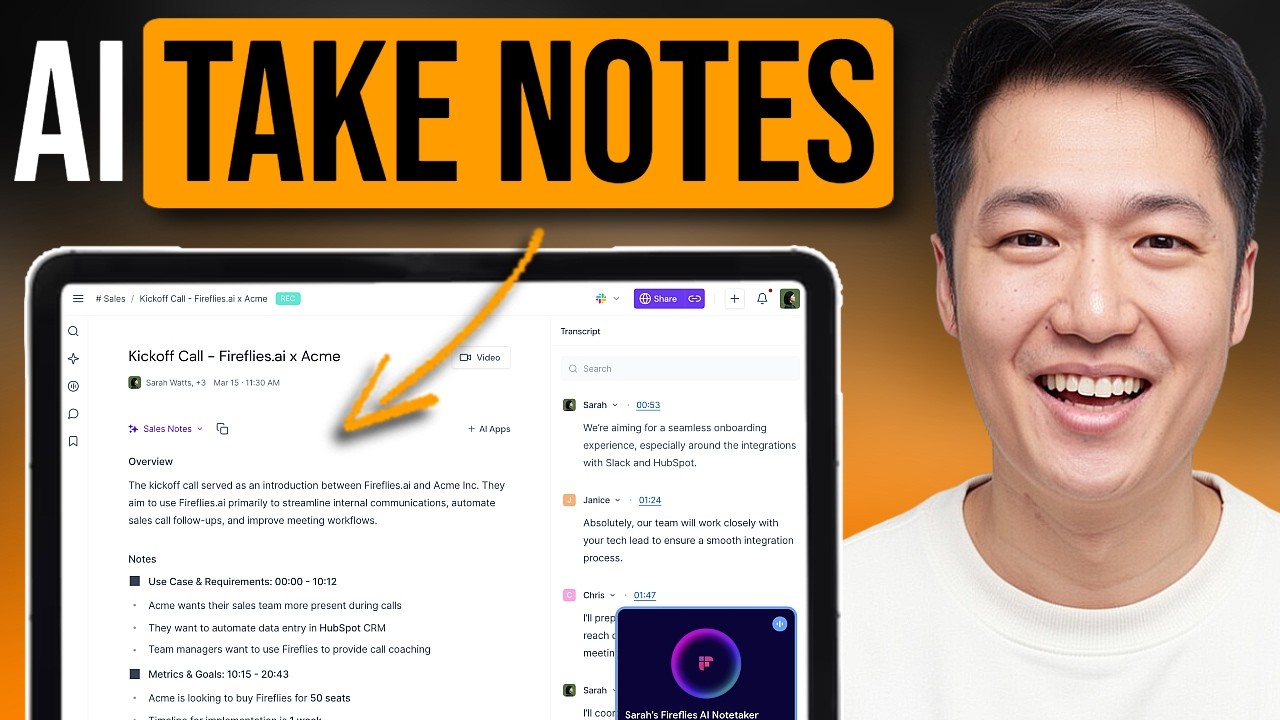
One of the tool’s best features is the Fireflies.ai Notetaker Zoom bot. It joins meetings automatically and creates a detailed summary and transcript for review.

Fireflies Chrome Extension

Fireflies offers a browser extension that allows users to capture voice notes outside meetings. This improves flexibility when managing personal tasks or notes.

Meeting Analytics and Action Items

Fireflies AI includes a summary panel showing meeting sentiment, time breakdowns, and action items. This helps teams stay organized after every meeting.

Fireflies AI Features

The features highlighted in every fireflies ai review focus on its seamless meeting transcription, AI-powered summaries, and calendar integrations. What makes Fireflies stand out in many fireflies.ai reviews is the powerful fireflies note taker zoom functionality, which records, transcribes, and organizes meetings directly from Zoom without user intervention. The fireflies note taker zoom bot joins scheduled meetings and accurately converts voice to text. Most fireflies.ai reviews praise the clean interface and real-time collaboration options that help teams extract action items and insights instantly. With each fireflies ai review, it’s clear that its features cater to both individual professionals and large teams.

  • Automatic Meeting Recording
  • Limited Custom Branding
  • Real-time Transcription
  • Speaker Identification
  • CRM and Slack Integration
  • Fireflies.ai Notetaker Zoom Bot
  • Meeting Analytics and Sentiment
  • Smart Search Filters
  • Voice Notes via Chrome Extension
  • No Live Translation
  • No Video Editing Capabilities
  • No Offline Usage

Fireflies AI Videos

Fireflies software provides onboarding and tutorial videos to help users set up quickly. The Fireflies.ai tutorial section on the dashboard includes guides for installing the Zoom Notetaker, using the Chrome extension, and setting up integrations.These videos walk users through the dashboard, show how to review transcripts, and explain how to extract summaries. The Fireflies.ai review library often refers to these tutorials as valuable for beginners learning to use Fireflies AI effectively.

Zootrix Tutorial
Proxy Seller Review
Liquid Web Hosting
Why Small Businesses Love DigiSigner

Fireflies AI Services

Across various fireflies.ai reviews, the platform’s services are seen as user centric. A standout mention in almost every fireflies ai review is its automatic fireflies note taker zoom service. This functionality not only transcribes Zoom calls but also stores and indexes them for easy search and retrieval. These services are especially praised in the most detailed fireflies.ai reviews, as they help businesses keep accurate records of client calls, internal meetings, and training sessions. The fireflies note taker zoom service eliminates the need for manual documentation, making it a favorite tool among remote teams and agencies. Many positive fireflies ai review entries mention how the services extend to integrations with CRMs and task managers, increasing its utility.

Read more: AEjuice Review | AltusHost Review | Apollo Review | CapCut Review

Fireflies AI Pricing

Fireflies pricing is structured across three simple tiers designed to fit different team sizes and usage levels. Whether you’re an individual needing basic meeting transcription or a business requiring advanced collaboration tools, there’s a plan for you. The free tier includes limited storage, while paid plans offer features like unlimited transcription, CRM integration, and smart summaries. Fireflies pricing remains transparent with no hidden fees, making it easy to choose the right plan.

  • Free Plan
    Offers limited transcription storage and basic notetaking. Fireflies pricing at this level includes 800 minutes of storage per seat.
  • Pro Plan – ₹770/month ($10 USD)
    Includes unlimited transcription storage, advanced search filters, and CRM integrations. It supports Fireflies.ai notetaker Zoom and Google Meet.
  • Business Plan – ₹1,540/month ($19 USD)
    Adds team collaboration features, bulk exports, and full conversation intelligence. Suitable for larger teams that depend on Fireflies software daily.

According to multiple fireflies.ai reviews, the paid plans offer significant value for remote teams. Fireflies pricing is transparent with no hidden fees. The tool also offers enterprise-level options for large organizations.

Fireflies AI Free Trial

New users can start with a free Fireflies account. The Fireflies free trial offers limited access to the notetaker bot, transcription storage, and dashboard tools. While Fireflies pricing is already reasonable, the free plan helps users test the basics before committing.

Fireflies.ai notetaker Zoom access is available even during the trial. This makes it easy to compare Fireflies with other tools in the same category.

4.5 EASE OF USE
4.0 VALUE FOR MONEY
4.1/span> CUSTOMER SUPPORT
4.0 FUNCTIONALITY
john c Product Director
Review Date: 29 August, 2024

SaleFish Digital Identity

Project Type :Digital Marketing

“Fireflies AI is an intuitive meeting assistant that automates recording, transcription, and summarization across popular platforms. Its seamless integrations and actionable summaries enhance tracking and collaboration. While transcription accuracy dips with accents or noisy environments and support can lag, it remains a valuable productivity booster for fast-paced teams”.

EASE OF USE
OVERALL RATING
OVERALL RATING
OVERALL RATING

Fireflies AI Alternatives

While Fireflies AI is a widely used meeting assistant, some users explore alternatives based on pricing, platform support, or specialized use cases. Many fireflies ai review articles highlight its Zoom compatibility and AI-powered summaries, but not every user needs the same feature set. Whether you’re seeking deeper sales call analysis, stronger mobile functionality, or human transcription, there are tools that meet those needs. Below are some popular alternatives often compared with Fireflies software by professionals and teams.


 

WebinarNinja Review

WebinarNinja Review

4.4 (2,361)
Top Rated Features
  1. Live And Automated Videos
  2. Series Webinars
  3. Analytics
Explore More
LiveChat Review

LiveChat Review

4.8 (2,123)
Top Rated Features
  1. Versatile platform
  2. Import messages
  3. Customer support consistent
Explore More
EasyWebinar Review

EasyWebinar Review

3.9 (2,697)
Top Rated Features
  1. High-Quality Video
  2. Collaboration Tools
  3. No Delay Streaming
Explore More
Livestorm Review

Livestorm Review

4.4 (2,756)
Top Rated Features
  1. Host Tools
  2. Social Media Integration
  3. Meeting Coordination
Explore More
FAQs

Frequently Asked Questions

While Fireflies AI is a popular meeting transcription and note-taking tool, some users may prefer alternatives based on pricing, integrations, or advanced features. Whether you’re reading a fireflies ai review or comparing options like Zoom compatibility or collaboration tools, exploring other platforms can help you find the best fit. Here are some top alternatives to Fireflies software that users consider when evaluating meeting productivity tools.

Yes, the fireflies.ai notetaker Zoom integration allows the bot to automatically join meetings, record audio, and generate searchable transcripts. The fireflies note taker Zoom feature also supports auto-summaries, making it ideal for users who want seamless documentation of virtual calls.

Fireflies pricing starts with a free plan offering limited features. Paid tiers include the Pro plan at ₹770/month and Business at ₹1,540/month. For larger teams, the fireflies software also offers enterprise-level custom pricing with added control and storage options.

Yes, fireflies software is built with enterprise-grade security. It includes data encryption, access controls, and secure storage of recordings. Many fireflies.ai reviews mention that the platform is reliable and trusted for business-level meeting documentation and compliance.

Yes, Fireflies AI is completely browser-based. There is no need to install the fireflies software to use core features like meeting recording, transcription, and summaries. The platform also offers a Chrome extension for added convenience.

According to many fireflies ai review articles, Fireflies offers CRM integration, meeting summaries, and workflow automation. Otter.ai focuses mainly on transcription, while Fireflies AI positions itself as a full meeting intelligence tool for teams.

Yes, besides Zoom, the fireflies.ai notetaker also integrates with Microsoft Teams, Google Meet, and Webex. This makes Fireflies AI a flexible choice for teams using multiple platforms for virtual collaboration.

Currently, fireflies software does not offer a dedicated mobile app. However, users can access the platform through its browser interface and Chrome extension, which works well for desktop-based workflows.

Yes, Fireflies AI allows paid users to export transcripts in formats like TXT, PDF, and DOCX. The Business plan under fireflies pricing supports bulk exports, making it suitable for teams that need regular offline access to meeting notes.

Yes, freelancers and solo professionals often use Fireflies AI to document client meetings, sales calls, and project discussions. Fireflies.ai review feedback frequently notes how useful the tool is for staying organized without extra effort.

Yes, fireflies ai support is available through live chat, email, and a dedicated help center. Users also benefit from weekly training sessions and documentation to help them navigate fireflies software effectively.

Ideal Online Business
By chatting, you agree to our terms.